cancel
Showing results for 
Search instead for 
Did you mean: 

The Power BI Data Visualization World Championships is back! Get ahead of the game and start preparing now! Learn more

Reply
Anonymous
Not applicable

Issue with publishing report

Hi,


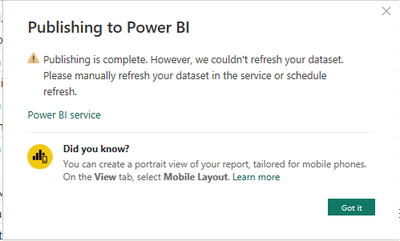
For about two days, I get the following error message when publishing desktop report to Power BI Server workspace. 

ElistheFox2_0-1680765810621.png

It says: "Publishing is complete." However when I look at the current report already published in the workspace, there is no change in it..nothing happened.


Thanks for your help,


Eliska


2 REPLIES 2
Anand24
Super User
Super User

Hi @Anonymous ,
Can you provide bit more information:
1. What data source are you using?
2. Is this issue workspace or user specific?

ALso, did you try to publish directly from services instead of desktop?

PBI_SuperUser_Rank@1x.png  

Give a Thumbs Up if this post helped you in any way and Mark This Post as Solution if it solved your query !!!

Proud To Be a Super User !!!
LinkedIn

Anonymous
Not applicable

Yes, of course, my data source consists of 4 tables imported from Microsoft SQL Server client. It seems that the problem is workspace related since I can publish this report on my personal workspace without any problems.

Helpful resources

Announcements
Power BI DataViz World Championships

Power BI Dataviz World Championships

The Power BI Data Visualization World Championships is back! Get ahead of the game and start preparing now!

December 2025 Power BI Update Carousel

Power BI Monthly Update - December 2025

Check out the December 2025 Power BI Holiday Recap!

FabCon Atlanta 2026 carousel

FabCon Atlanta 2026

Join us at FabCon Atlanta, March 16-20, for the ultimate Fabric, Power BI, AI and SQL community-led event. Save $200 with code FABCOMM.