cancel
Showing results for 
Search instead for 
Did you mean: 

The Power BI Data Visualization World Championships is back! Get ahead of the game and start preparing now! Learn more

Reply

Issue with Timeline Slicer on online reports

Hi all, 


For the past two weeks I have been dealing with a bug on the Timeline Slicer


I use it across my dashboards, and it works perfectly on the Desktop version. But once my reports are shared online, I and all my users experience the following.


The report opens with no selection on the timeline slicer (see below)
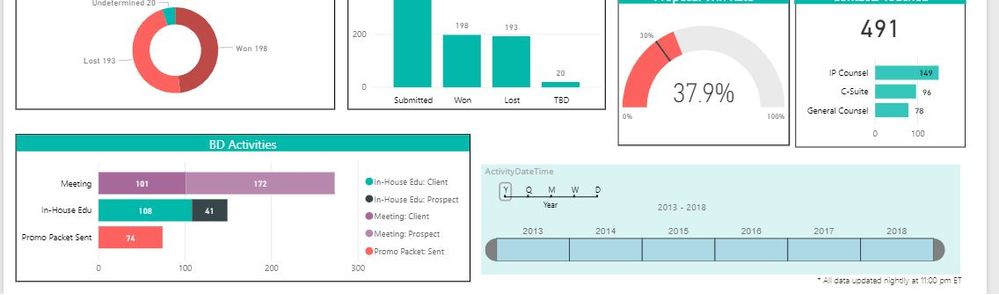
 

Capture.JPG


When the user clicks on one of the years in the slicer, the report  filters as designed.  So far so good.


However, when the user attempts to reset the slicer to cover the entire timeline, the slicer starts jumping around uncontrollably, oscillating between the single year and the whole timeline.  The only way to stop the oscillation is to refresh the page.


Essentially this makes the report unusable.


The timeline slicer is so much more functional than the basic date slicer, and I really want to keep it in my reports.


I'm using Chrome but the same thing happens in Firefox.


This issue just cropped up over the past two weeks. -- the slicer used to work perfectly in the online reports.


Any help would be appreciated Smiley Happy


Thanks.

Gordon


2 ACCEPTED SOLUTIONS
v-juanli-msft
Community Support
Community Support

Hi @gbraunwoodbury

Unfortunately, I can't reproduce your problem using Chrome on my site.

a temperaly workaround is to add a slicer on the report, then add the "date" column to the silcer. "reset the slicer to cover the entire timeline", to achieve the goal above, you could select one item on the slicer, then the timeline slicer would set to cover the entire timeline, next clear selections on the slicer.


Best Regards

Maggie

View solution in original post

Thanks... I am suspicious that the issue may be due to a version conflict, since it only started after the last PowerBI update on 8 August.  Unfortunately I am working on a VM and my client’s IT policies restrict me from updating the version myself — so I am waiting for IT to get around to it.  Meanwhile I have substituted a slmple date slicer for the timeline, and the problem has vanished.

View solution in original post

2 REPLIES 2
v-juanli-msft
Community Support
Community Support

Hi @gbraunwoodbury

Unfortunately, I can't reproduce your problem using Chrome on my site.

a temperaly workaround is to add a slicer on the report, then add the "date" column to the silcer. "reset the slicer to cover the entire timeline", to achieve the goal above, you could select one item on the slicer, then the timeline slicer would set to cover the entire timeline, next clear selections on the slicer.


Best Regards

Maggie

Thanks... I am suspicious that the issue may be due to a version conflict, since it only started after the last PowerBI update on 8 August.  Unfortunately I am working on a VM and my client’s IT policies restrict me from updating the version myself — so I am waiting for IT to get around to it.  Meanwhile I have substituted a slmple date slicer for the timeline, and the problem has vanished.

Helpful resources

Announcements
November Power BI Update Carousel

Power BI Monthly Update - November 2025

Check out the November 2025 Power BI update to learn about new features.

Fabric Data Days Carousel

Fabric Data Days

Advance your Data & AI career with 50 days of live learning, contests, hands-on challenges, study groups & certifications and more!

FabCon Atlanta 2026 carousel

FabCon Atlanta 2026

Join us at FabCon Atlanta, March 16-20, for the ultimate Fabric, Power BI, AI and SQL community-led event. Save $200 with code FABCOMM.