


cancel
Showing results for 
Search instead for 
Did you mean: 

Join the FabCon + SQLCon recap series. Up next: Power BI, Real-Time Intelligence, IQ and AI, and Data Factory take center stage. All sessions are available on-demand after the live show. Register now

Reply
Anonymous
Not applicable

Issue is matrix visual

Hi All,

I'm facing an issue in Matrix. May be I'm lacking in some tips and tricks.

I want to calculate last 90 days average COGS where purchase type is "Import"


My dax is = 

(CALCULATE(SUM(Fact_Cost[COGS]),Dim_Article[PurchaseType]="Import",DATESINPERIOD(Dim_Date[Date],MAX(Dim_Date[Date]),-91,DAY)) /(CALCULATE(DISTINCTCOUNT(Fact_Sales[Date]),DATESINPERIOD(Dim_Date[Date],MAX(Dim_Date[Date]),-91,DAY))))
 
And also I'm getting correct value.
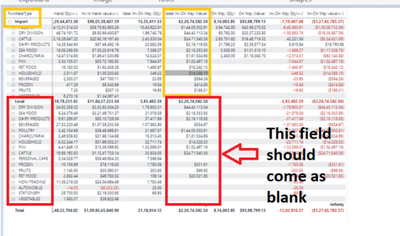
But in Matrix whenever I put this as value, Other Purchase type is also showing with the value of "Import"
My requirement is only to show value of "Import", and others should come as blank.
 
Rimi_2095_0-1652702836889.png

Note: I'm unable to share pbix file as I'm woring in VM.


@amitchandak @SpartaBI @Ashish_Mathur @DataInsights @Shishir22 @Jihwan_Kim @johnt75 @speedramps 


1 ACCEPTED SOLUTION
SpartaBI
Community Champion
Community Champion

@Anonymous try this:


My dax is = 

(CALCULATE(SUM(Fact_Cost[COGS]),KEEPFILTERS(Dim_Article[PurchaseType]="Import"),DATESINPERIOD(Dim_Date[Date],MAX(Dim_Date[Date]),-91,DAY)) /(CALCULATE(DISTINCTCOUNT(Fact_Sales[Date]),DATESINPERIOD(Dim_Date[Date],MAX(Dim_Date[Date]),-91,DAY))))


2022-05-09 22_36_04-Power BI Workspace Datasets License Permissions - Microsoft Power BI Community.png

Showcase Report – Contoso By SpartaBI


SpartaBI_3-1652115470761.png  SpartaBI_1-1652115142093.png   SpartaBI_2-1652115154505.png

Full-Logo11.png

View solution in original post

3 REPLIES 3
speedramps
Super User
Super User

HI Rimi_2095


I recommend that you do some online training about CALCULATE and FILTER.

Click here for free training videos 


If I have a list of cat and value in ttable visual

A=10

B=22

C=33


And use TotalBcalculate = CALCULATE( SUM(facts[value]), facts[cat] = B”)

the it will return 22 for every row because CALCULATE “overrides” the visual natural grid context


Whereas 


TotalBfilter = 

// this gets a subset of just rows B
VAR mysubset =  FILTER(table, facts[cat] = "B”)

// this sums just the subset
RETURN
CALCULATE(SUM(facts[value]), mysubset)


So your answer try this …

My dax is =


// get a subset (please note you can test and view this subset with create table !!)

VAR mysubset =  
FILTER(Fact_Sales,
DATESINPERIOD(Dim_Date[Date], MAX(Dim_Date[Date]),-91,DAY))


RETURN
DIVIDE(
CALCULATE(SUM(Fact_Cost[COGS]), mysubset),

CALCULATE(DISTINCTCOUNT(Fact_Sales[Date]), mysubset)

)


Please click thumbs up and accept as solution button. Thanks

SpartaBI
Community Champion
Community Champion

@Anonymous try this:


My dax is = 

(CALCULATE(SUM(Fact_Cost[COGS]),KEEPFILTERS(Dim_Article[PurchaseType]="Import"),DATESINPERIOD(Dim_Date[Date],MAX(Dim_Date[Date]),-91,DAY)) /(CALCULATE(DISTINCTCOUNT(Fact_Sales[Date]),DATESINPERIOD(Dim_Date[Date],MAX(Dim_Date[Date]),-91,DAY))))


2022-05-09 22_36_04-Power BI Workspace Datasets License Permissions - Microsoft Power BI Community.png

Showcase Report – Contoso By SpartaBI


SpartaBI_3-1652115470761.png  SpartaBI_1-1652115142093.png   SpartaBI_2-1652115154505.png

Full-Logo11.png

Anonymous
Not applicable

Hi @SpartaBI 

It worked.. Thanks a lot..


Helpful resources

Announcements
April Power BI Update Carousel

Power BI Monthly Update - April 2026

Check out the April 2026 Power BI update to learn about new features.

New to Fabric survey Carousel

New to Fabric Survey

If you have recently started exploring Fabric, we'd love to hear how it's going. Your feedback can help with product improvements.

Power BI DataViz World Championships carousel

Power BI DataViz World Championships - June 2026

A new Power BI DataViz World Championship is coming this June! Don't miss out on submitting your entry.

FabCon and SQLCon Highlights Carousel

FabCon & SQLCon Highlights

Experience the highlights from FabCon & SQLCon, available live and on-demand starting April 14th.