Don't miss your chance to take the Fabric Data Engineer (DP-600) exam for FREE! Find out how by attending the DP-600 session on April 23rd (pacific time), live or on-demand.
Learn moreNext up in the FabCon + SQLCon recap series: The roadmap for Microsoft SQL and Maximizing Developer experiences in Fabric. All sessions are available on-demand after the live show. Register now
Hi everyone,
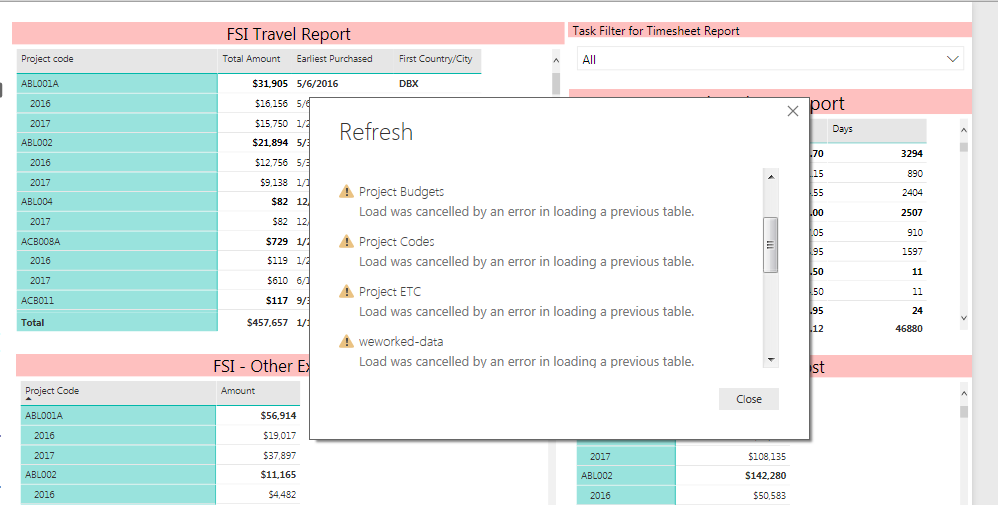
I have connected my Power BI Desktop file to my OneDrive for Business account. When i refresh my pbix file from Refresh button in 'Home' tab, it gives me error in all of my files as shown in attached screenshot. However, when i individually refresh these files then it gives no error. How can i resolve this issue so that i can refresh all the files at same time by just clicking on refresh button?
Regards,
Amna Anwer
Solved! Go to Solution.
HI @amnaanwer,
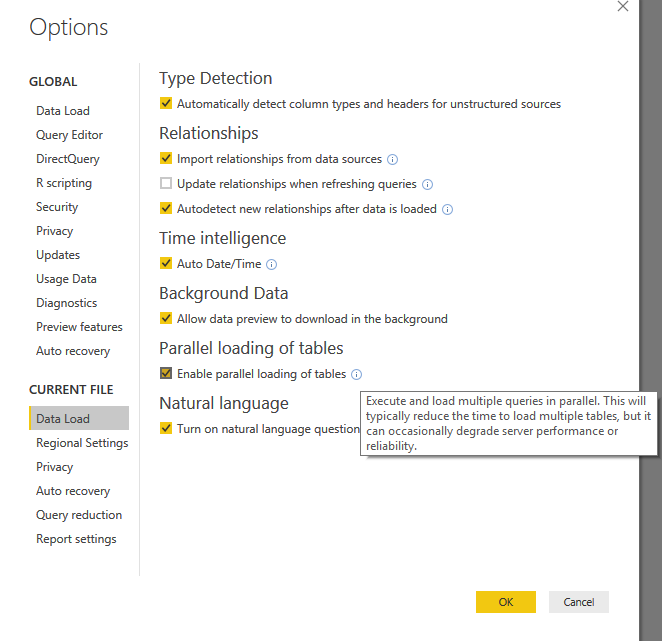
I'd like to suggest you turn on the 'parallel loading of tables' feature to loading tables at same time instead queue loading.
It will ignore failed table in queue and loading next tables.
In addition, if your tables contains reference from another table, it will also break loading when reference table failed loading.
Regards,
Xiaoxin Sheng
HI @amnaanwer,
I'd like to suggest you turn on the 'parallel loading of tables' feature to loading tables at same time instead queue loading.
It will ignore failed table in queue and loading next tables.
In addition, if your tables contains reference from another table, it will also break loading when reference table failed loading.
Regards,
Xiaoxin Sheng
@amnaanwer Hello,
-Can you send a sample of your file ?
There might be a problem with the volumetry, if refresh works for each file individually.
I often had the same problem with an Excel source (there were formula errors in the Excel spreadsheet)
Keep me informed !
Best Regards,
Augustin
If you have recently started exploring Fabric, we'd love to hear how it's going. Your feedback can help with product improvements.
A new Power BI DataViz World Championship is coming this June! Don't miss out on submitting your entry.
Share feedback directly with Fabric product managers, participate in targeted research studies and influence the Fabric roadmap.