This time we’re going bigger than ever. Fabric, Power BI, SQL, AI and more. We're covering it all. You won't want to miss it.
Learn moreLevel up your Power BI skills this month - build one visual each week and tell better stories with data! Get started
Hello,
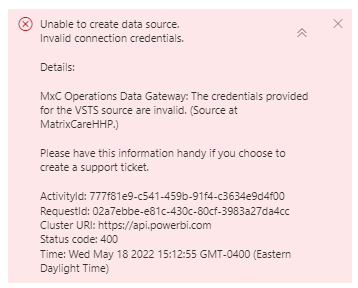
I am getting an error when trying to refresh the dataset that I published for data sources coming from Azure boards> Analytics views.
I can authenticate in power bi desktop to build the report, but once published to Power bi, on the web the subsequent refreshes are failing with invalid credentials. We do have okta set up so I even tried to add a gateway for auth but adding the source to the gateway is not working with the same issue. My credentials are correct as I can log in to Azure DevOps with the same credentials.
Here is the error I am getting.
Hi @tsutaria ,
You may try the solution from Community Support Xiaoxin in the following link. Hope it helps.
Solved: Can't "Schedule Refresh" when successfully connect... - Microsoft Power BI Community
Also, there is an existing ICM for this issue(299120999). Per the reply from product group, the failed reason is because the credential has been rejected by the data source. You need to make sure the right credential has been used. If you believe you did enter the right credential, then please contact the owner of this extension ("VSTS") to future debug.
Best Regards,
Liu Yang
If this post helps, then please consider Accept it as the solution to help the other members find it more quickly.
Check out the April 2026 Power BI update to learn about new features.
Sign up to receive a private message when registration opens and key events begin.
If you have recently started exploring Fabric, we'd love to hear how it's going. Your feedback can help with product improvements.
| User | Count |
|---|---|
| 11 | |
| 9 | |
| 9 | |
| 7 | |
| 6 |
| User | Count |
|---|---|
| 42 | |
| 27 | |
| 25 | |
| 22 | |
| 22 |