Hello there,
can you help us with incremental refresh for Azure DevOps, please?
We have defined PowerBI dataflow based on OData protocol to feed data from Azure DevOps (e.g. WorkItems, WorkItemRevisions) . Now, we have incremental refresh options switched OFF and queries are running quite seamlessly.
However, when we switch incremental refresh options ON, we can not refesh dataflow.
We've made some tests, even reducing dataflow to one query, but it hasn't helped.
We keep receiving errors (log from Refresh history):
2021-07-28 12:52:29,DevOpsV2_DEV,Failed,WorkItems (Project: WAW Language Services),NA,Failed,2021-07-28 12:52:29,2021-07-28 12:54:36,00:02:06.9470,NA,NA,NA,NA,NA,NA,Error: Data Source Error : DataSource.Error: OData: Request failed: The remote server returned an error: (500) Internal Server Error. (Internal Server Error) DataSourceKind = OData DataSourcePath = https://analytics.dev.azure.com/liox-glt-technicalservices/WAW%20Language%20Services/_odata/WorkItem... Url = https://analytics.dev.azure.com/liox-glt-technicalservices/WAW Language Services/_odata/WorkItems. RootActivityId = dd3cd6bf-c378-4aa9-a865-e5d77a6e38a9.Param1 = DataSource.Error: OData: Request failed: The remote server returned an error: (500) Internal Server Error. (Internal Server Error) DataSourceKind = OData DataSourcePath = https://analytics.dev.azure.com/liox-glt-technicalservices/WAW%20Language%20Services/_odata/WorkItem... Url = https://analytics.dev.azure.com/liox-glt-technicalservices/WAW Language Services/_odata/WorkItems Request ID: a6cf3365-cf94-344e-530a-9d2b69f71f23.

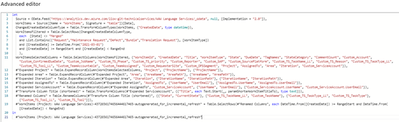
Dataflow query (with steps automatically added for incremental refresh):
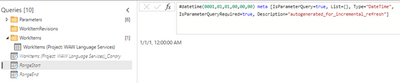
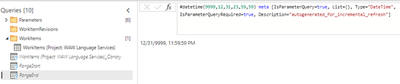
And dataflow parameters:
With time the number of records in Azure DevOps will grow and we may not be able to refresh the whole dataflow.
We also think about connecting to internal DevOps SQL Server directly and there set up incremental refresh.
But as far as we know, it's not possible to connect to internal SQL Server.
We appreciate your help.
Regards,
Rafał


