cancel
Showing results for 
Search instead for 
Did you mean: 

The Power BI Data Visualization World Championships is back! Get ahead of the game and start preparing now! Learn more

Reply
Anonymous
Not applicable

Incremental refresh failure

Hi All,

I am using Power BI pro and recently, I tried to configure incremental refresh.  My data source is a cloud SQL server database which consists of two years of data containing more than 6 million records. When I do the initial refresh, it took more than two hours and gave a timeout error. I tried this several times and the result was the same.

Thanks

Regards

Udara

1 ACCEPTED SOLUTION
Greg_Deckler
Community Champion
Community Champion

@Anonymous - That's kind of surprising, I've ingested that many rows into Power BI Desktop in like 15 minutes. Perhaps you need to bump up the resources on your cloud SQL Server instance? Maybe ingest everything and then setup incremental refresh?


Follow on LinkedIn
@ me in replies or I'll lose your thread!!!
Instead of a Kudo, please vote for this idea
Become an expert!: Enterprise DNA
External Tools: MSHGQM
YouTube Channel!: Microsoft Hates Greg
Latest book!:
DAX For Humans

DAX is easy, CALCULATE makes DAX hard...

View solution in original post

3 REPLIES 3
v-yingjl
Community Support
Community Support

Hi @Anonymous ,

The first refresh may take longer to import the historical data when configuring incremental refresh. 

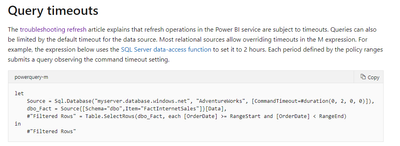
If the refresh is timeout, you can try to set the timeout range to check it manually like this in power query

query timeout.png

In addition, you can enable XMLA endpoint to benefit your incremental refresh, refer this document:

XMLA endpoint benefits for incremental refresh 


Best Regards,
Yingjie Li

If this post helps then please consider Accept it as the solution to help the other members find it more quickly.

Greg_Deckler
Community Champion
Community Champion

@Anonymous - That's kind of surprising, I've ingested that many rows into Power BI Desktop in like 15 minutes. Perhaps you need to bump up the resources on your cloud SQL Server instance? Maybe ingest everything and then setup incremental refresh?


Follow on LinkedIn
@ me in replies or I'll lose your thread!!!
Instead of a Kudo, please vote for this idea
Become an expert!: Enterprise DNA
External Tools: MSHGQM
YouTube Channel!: Microsoft Hates Greg
Latest book!:
DAX For Humans

DAX is easy, CALCULATE makes DAX hard...
Anonymous
Not applicable

Thanks!!

Helpful resources

Announcements
Power BI DataViz World Championships

Power BI Dataviz World Championships

The Power BI Data Visualization World Championships is back! Get ahead of the game and start preparing now!

December 2025 Power BI Update Carousel

Power BI Monthly Update - December 2025

Check out the December 2025 Power BI Holiday Recap!

FabCon Atlanta 2026 carousel

FabCon Atlanta 2026

Join us at FabCon Atlanta, March 16-20, for the ultimate Fabric, Power BI, AI and SQL community-led event. Save $200 with code FABCOMM.