Share feedback directly with Fabric product managers, participate in targeted research studies and influence the Fabric roadmap.
Sign up nowGet Fabric certified for FREE! Don't miss your chance! Learn more
Hi guys,
Could you help me deeply understand the polling expression? I saw this feature as using for detecting data change between incremental refresh period, but I cannot exactly understand how it works.
Solved! Go to Solution.
Hi @Kaan_Mavice ,
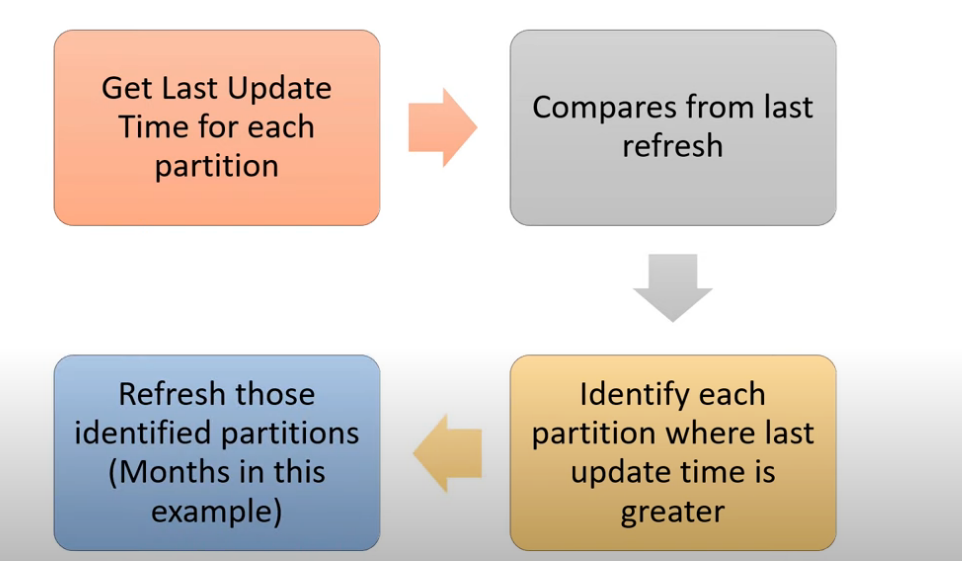
According to the official document, detect data changes needs you specify a date/time column used to identify and refresh only the days where the data has changed. (This should not be the same column used to partition the data with the RangeStart and RangeEnd parameters.) The maximum value of this column is evaluated for each of the periods in the incremental range. If it has not changed since the last refresh, the current period is not refreshed. Therefore, it will use the resources efficiently and make the refresh quicker. For more details, you could refer to Configure incremental refresh and real-time data for Power BI datasets - Power BI | Microsoft Docs and Advanced incremental refresh and real-time data with the XMLA endpoint in Power BI - Power BI | Micr....
Basically, it works as the following flow summarized in this video from Guy in Cube(Power BI Incremental Refresh - Understanding Detect Data Changes - YouTube).
If there is any post helps, then please consider Accept it as the solution to help the other members find it more quickly. If I misunderstand your needs or you still have problems on it, please let me know. Thanks a lot!
Best Regards,
Community Support Team _ Caiyun
Hi @Kaan_Mavice ,
According to the official document, detect data changes needs you specify a date/time column used to identify and refresh only the days where the data has changed. (This should not be the same column used to partition the data with the RangeStart and RangeEnd parameters.) The maximum value of this column is evaluated for each of the periods in the incremental range. If it has not changed since the last refresh, the current period is not refreshed. Therefore, it will use the resources efficiently and make the refresh quicker. For more details, you could refer to Configure incremental refresh and real-time data for Power BI datasets - Power BI | Microsoft Docs and Advanced incremental refresh and real-time data with the XMLA endpoint in Power BI - Power BI | Micr....
Basically, it works as the following flow summarized in this video from Guy in Cube(Power BI Incremental Refresh - Understanding Detect Data Changes - YouTube).
If there is any post helps, then please consider Accept it as the solution to help the other members find it more quickly. If I misunderstand your needs or you still have problems on it, please let me know. Thanks a lot!
Best Regards,
Community Support Team _ Caiyun
If you love stickers, then you will definitely want to check out our Community Sticker Challenge!
Check out the January 2026 Power BI update to learn about new features.
| User | Count |
|---|---|
| 18 | |
| 7 | |
| 7 | |
| 7 | |
| 7 |
| User | Count |
|---|---|
| 51 | |
| 43 | |
| 27 | |
| 27 | |
| 25 |