I am facing an issue while patching the credentials of a data set. Our application is using the service principal to upload PowerBI reports to the respective PowerBI workspace. Most of the report is using Web Api sources, so we are patching the data source credentials using the below code, and it is working as expected.
//Create UpdateDatasourceRequest to update datasource credentials
var credentials = new AnonymousCredentials();
var credentialDetails = new CredentialDetails(credentials, PrivacyLevel.None, EncryptedConnection.NotEncrypted);
UpdateDatasourceRequest req = new UpdateDatasourceRequest(credentialDetails);

//Execute Patch command to update datasource credentials
await client.Gateways.UpdateDatasourceAsync((Guid)gatewayId, (Guid)datasourceId, req, cancellationToken);
We recently created a Power BI report with data flow as a data source (please note that the data flow is not created by the service principal), and when we tried to refresh the dataset after publishing the report to workspace, it threw an error: "Some of the data sources have missing credentials."
The credentials configuration is currently displayed in Power BI as follows:
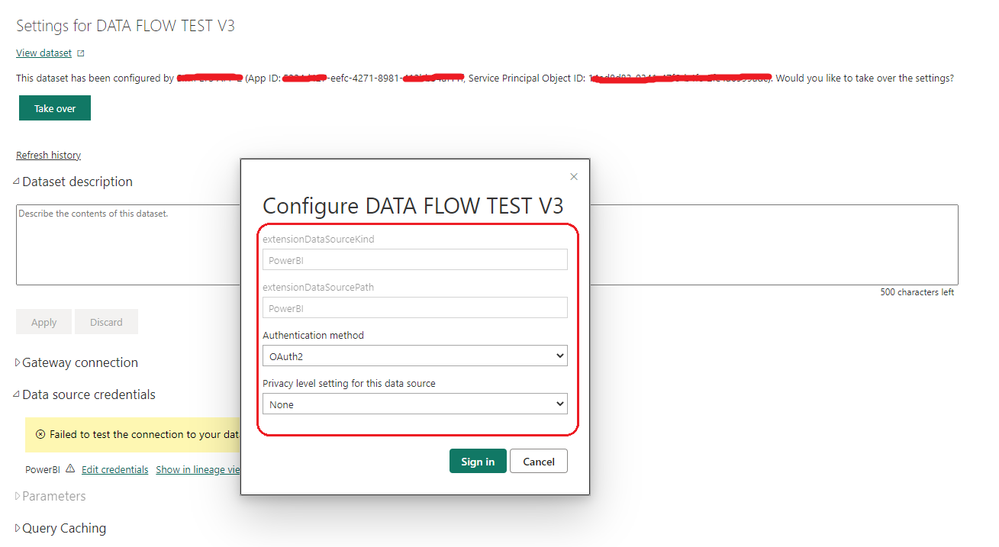
After going through the following tutorial, I used the code below to set the credentials.
https://learn.microsoft.com/en-us/power-bi/developer/embedded/configure-credentials?tabs=sdk3
var gateway = pbiClient.Gateways.GetGatewayById(datasource.GatewayId);
var credentialsEncryptor = new AsymmetricKeyEncryptor(gateway.publicKey);
var credentialDetails = new CredentialDetails(
        credentials,
        PrivacyLevel.Private,
        EncryptedConnection.Encrypted,
        credentialsEncryptor);
However, because all of the data is in the cloud (Azure), obtaining the public key from the gateway is impossible.
I also tried the following code without encrypting the details, but it did not work. I received a Bad Request error and am pasting the exact error also.
var delta = new UpdateDatasourceRequest
{
   CredentialDetails = new CredentialDetails
    {
      CredentialType = "OAuth2",
      Credentials = "{\"credentialData\":[{\"name\":\"accessToken\", \"value\":\""+ result.AccessToken + "\"}]}",
      EncryptedConnection = "Encrypted",
      EncryptionAlgorithm = "None",
      PrivacyLevel = "None"
    }
};

await client.Gateways.UpdateDatasourceAsync((Guid)gatewayId, (Guid)datasourceId, delta, cancellationToken);
{"error":{"code":"DM_GWPipeline_Gateway_InvalidConnectionCredentials","pbi.error":{"code":"DM_GWPipeline_Gateway_InvalidConnectionCredentials","parameters":{},"details":[{"code":"DM_ErrorDetailNameCode_UnderlyingErrorCode","detail":{"type":1,"value":"-2147467259"}},{"code":"DM_ErrorDetailNameCode_UnderlyingErrorMessage","detail":{"type":1,"value":"The credentials provided for the PowerBI source are invalid. (Source at PowerBI.)"}},{"code":"DM_ErrorDetailNameCode_UnderlyingHResult","detail":{"type":1,"value":"-2147467259"}},{"code":"Microsoft.Data.Mashup.CredentialError.DataSourceKind","detail":{"type":1,"value":"PowerBI"}},{"code":"Microsoft.Data.Mashup.CredentialError.DataSourceOriginKind","detail":{"type":1,"value":"Web"}},{"code":"Microsoft.Data.Mashup.CredentialError.DataSourceOriginPath","detail":{"type":1,"value":"https://api.powerbi.com/powerbi/globalservice/v201606/clusterdetails"}},{"code":"Microsoft.Data.Mashup.CredentialError.DataSourcePath","detail":{"type":1,"value":"PowerBI"}},{"code":"Microsoft.Data.Mashup.CredentialError.Reason","detail":{"type":1,"value":"AccessForbidden"}},{"code":"Microsoft.Data.Mashup.MashupSecurityException.DataSources","detail":{"type":1,"value":"[{\"kind\":\"PowerBI\",\"path\":\"PowerBI\"}]"}},{"code":"Microsoft.Data.Mashup.MashupSecurityException.Reason","detail":{"type":1,"value":"AccessForbidden"}}],"exceptionCulprit":1}}}
I'm missing something; any suggestions you have would be greatly appreciated.
Thanks in advance.


