Don't miss your chance to take the Fabric Data Engineer (DP-700) exam on us!
Learn moreThe FabCon + SQLCon recap series starts April 14th at 8am Pacific. If you’re tracking where AI is going inside Fabric, this first session is a can't miss. Register now
In one of my reports, I'd like to be able to select a cell from the table visual, copy its contents, and paste it somewhere in another window. PowerBI does not allow this, so I have to enter the value manually. Is there any way around this?
Solved! Go to Solution.
@antonstam There is no write back within visuals... you can't look at a dataset, then manually change it. The only way to "write back" to the datasource would be to create a Power App and put that in your dashboard. That is the only means I'm aware of to initiate changes from the Service to the data source.
If you are just asking about copy from and paste outside of the tool, the answer is still no. But you can click on the '..." on the upper right and "Export Data" - this would output the underlying dataset. (Provided this functionality has not been disabled by an admin)
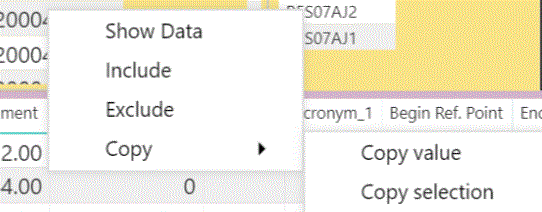
I would like this to be utilized by others using my Report in Power BI. I can right click on an object in a visualization then have the options of Show Data
Incluce
Exclude
Copy
Copy Value
Copy Selection
Others using the report do not have the Copy functionality. How do they get it activated for them?
@antonstam There is no write back within visuals... you can't look at a dataset, then manually change it. The only way to "write back" to the datasource would be to create a Power App and put that in your dashboard. That is the only means I'm aware of to initiate changes from the Service to the data source.
If you are just asking about copy from and paste outside of the tool, the answer is still no. But you can click on the '..." on the upper right and "Export Data" - this would output the underlying dataset. (Provided this functionality has not been disabled by an admin)
How can something be marked as a solution if what the poster requested is not a feature supported by PowerBI????
The answer was "NO"
If My car breaks down and when I go to the mechanic to get it fixed,
Then they tell me "NO",
I don't walk out of the shop feeling like I have a solution. Do you?
Upvote the downvote. The workaround of exporting data is super lame and Microsoft should for sure not consider it a solution. It is also lame that browsers somehow prevent this as well.
It's the second thing I was referring to - copy from the report, paste somewhere else. I'll make sure the export button is enabled and that the users are aware of this functionality.
If you have recently started exploring Fabric, we'd love to hear how it's going. Your feedback can help with product improvements.
A new Power BI DataViz World Championship is coming this June! Don't miss out on submitting your entry.
Share feedback directly with Fabric product managers, participate in targeted research studies and influence the Fabric roadmap.
| User | Count |
|---|---|
| 29 | |
| 23 | |
| 17 | |
| 16 | |
| 14 |