Hi @allora,
How about this?
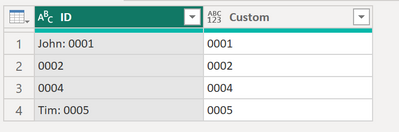
Here the code for the calculated column:
if Text.Contains ( [ID], ":" ) then Text.TrimStart ( Text.AfterDelimiter([ID], ":") ) else [ID]
And here the complete M code:
let
    Source = Table.FromRows(Json.Document(Binary.Decompress(Binary.FromText("i45W8srPyLNSMDAwMFSK1YlWAjKMYAwTMCMkMxcsb6oUGwsA", BinaryEncoding.Base64), Compression.Deflate)), let _t = ((type nullable text) meta [Serialized.Text = true]) in type table [ID = _t]),
    #"Changed Type" = Table.TransformColumnTypes(Source,{{"ID", type text}}),
    #"Added Custom" = Table.AddColumn(#"Changed Type", "Custom", each if Text.Contains ( [ID], ":" ) then  Text.TrimStart ( Text.AfterDelimiter([ID], ":") ) else [ID])
in
    #"Added Custom"
I understood your query that you actually don't want a new column but instead you'd like to replace the values. I recommend you this blog post here:
https://www.tackytech.blog/how-to-swiftly-take-over-power-query/#7_Replace_values_in_column
It explains how you can use the code from the new calculated column in order to replace the values (instead of adding a new one)
Let me know if this helps 🙂
/Tom
https://www.tackytech.blog/
https://www.instagram.com/tackytechtom/
| Did I answer your question❓➡️ Please, mark my post as a solution ✔️ | |
| Also happily accepting Kudos 🙂 | |
| #proudtobeasuperuser |  |


