This time we’re going bigger than ever. Fabric, Power BI, SQL, AI and more. We're covering it all. You won't want to miss it.
Learn moreDid you hear? There's a new SQL AI Developer certification (DP-800). Start preparing now and be one of the first to get certified. Register now
Hi,
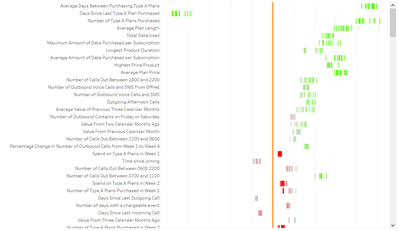
I would like to be able to recreate this graph from tableau in power bi.
The X axis is a measure of correlation for each of the labels on the y-axis. Each individual point in the graph is a date. The points have been changed to bars/lines, but this isn't necessary. The colours represent how strongly the average correlation over the date range is. The line in the middle is created after the fact.
I don't know if this is possible in power bi as you can't create a scatter plot with a single variable, or at least, I can't seem to. Alternatively, I have thought of trying to use some kind of edited bar chart but I think that's even less likely.
Thanks for any help!
Would you have some sample data that we could play with? Is this coming from a flat table ? What's the relevance of the date bucketing?
Check out the April 2026 Power BI update to learn about new features.
Sign up to receive a private message when registration opens and key events begin.
If you have recently started exploring Fabric, we'd love to hear how it's going. Your feedback can help with product improvements.
| User | Count |
|---|---|
| 10 | |
| 8 | |
| 8 | |
| 8 | |
| 7 |
| User | Count |
|---|---|
| 49 | |
| 27 | |
| 24 | |
| 20 | |
| 20 |