cancel
Showing results for 
Search instead for 
Did you mean: 

The Power BI Data Visualization World Championships is back! Get ahead of the game and start preparing now! Learn more

Reply
Anonymous
Not applicable

How much time did an user logged in?

Hello guys,


Supposed I have the following data of users, each time they logged in and logged out:

User    LoggingType   Date 

1         In                     2018-10-05 13:18:26.900

1         Out                  2018-10-05 13:18:54.353

1         In                     2018-10-05 13:19:23.637

1         Out                  2018-10-05 13:20:03.887

2         In                     2018-10-05 13:21:25.887

2         Out                  2018-10-05 13:22:01.247

3         In                     2018-10-10 18:24:33.867

3         Out                  2018-10-10 18:25:35.443


How do I create another column illustrating how long an user was logged in for a session? For example, here's what I wish to see:

User    LoggingType   Date                                      Duration

1         In                     2018-10-05 13:18:26.900      

1         Out                  2018-10-05 13:18:54.353      2018-10-05 13:18:54.353 - 2018-10-05 13:18:26.900

1         In                     2018-10-05 13:19:23.637

1         Out                  2018-10-05 13:20:03.887      2018-10-05 13:20:03.887 - 2018-10-05 13:19:23.637

2         In                     2018-10-05 13:21:25.887

2         Out                  2018-10-05 13:22:01.247      2018-10-05 13:22:01.247 - 2018-10-05 13:21:25.887

3         In                     2018-10-10 18:24:33.867

3         Out                  2018-10-10 18:25:35.443      2018-10-10 18:25:35.443 - 2018-10-10 18:24:33.867

1 ACCEPTED SOLUTION
v-danhe-msft
Microsoft Employee
Microsoft Employee

Hi @Anonymous ,

Based on my test, you could refer to below steps:

Add index for your data in query editor:

1.PNG

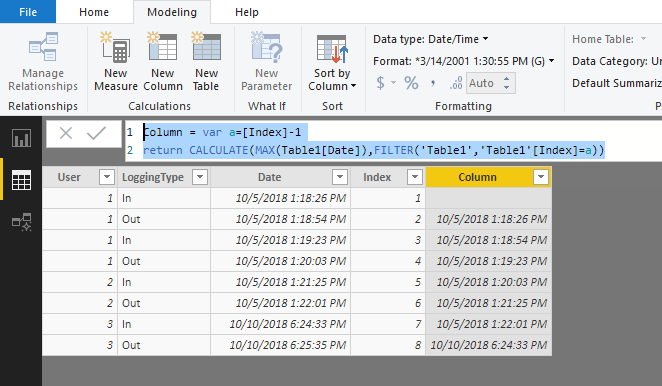
Apply it and create below formula:

Column = var a=[Index]-1
return CALCULATE(MAX(Table1[Date]),FILTER('Table1','Table1'[Index]=a))

Result:

1.PNG

Now you could use the [Date] column to minus the [Column].


Regards,

Daniel He


Community Support Team _ Daniel He
If this post helps, then please consider Accept it as the solution to help the other members find it more quickly.

View solution in original post

3 REPLIES 3
v-danhe-msft
Microsoft Employee
Microsoft Employee

Hi @Anonymous ,

Based on my test, you could refer to below steps:

Add index for your data in query editor:

1.PNG

Apply it and create below formula:

Column = var a=[Index]-1
return CALCULATE(MAX(Table1[Date]),FILTER('Table1','Table1'[Index]=a))

Result:

1.PNG

Now you could use the [Date] column to minus the [Column].


Regards,

Daniel He


Community Support Team _ Daniel He
If this post helps, then please consider Accept it as the solution to help the other members find it more quickly.
Anonymous
Not applicable

Thanks this is what I was looking for

GilbertQ
Super User
Super User

Hi there

What you would need to do, is to create an Index column and then you can create a calculated column which will then put in the data on the corresponding row

This answer explains how to achieve this: https://community.powerbi.com/t5/Desktop/How-to-get-previous-row-value-for-text-column/td-p/312560


Did I answer your question? Mark my post as a solution!

Proud to be a Super User!


Power BI Blog

Helpful resources

Announcements
November Power BI Update Carousel

Power BI Monthly Update - November 2025

Check out the November 2025 Power BI update to learn about new features.

Fabric Data Days Carousel

Fabric Data Days

Advance your Data & AI career with 50 days of live learning, contests, hands-on challenges, study groups & certifications and more!

FabCon Atlanta 2026 carousel

FabCon Atlanta 2026

Join us at FabCon Atlanta, March 16-20, for the ultimate Fabric, Power BI, AI and SQL community-led event. Save $200 with code FABCOMM.