Join us at FabCon Atlanta from March 16 - 20, 2026, for the ultimate Fabric, Power BI, AI and SQL community-led event. Save $200 with code FABCOMM.
Register now!The Power BI Data Visualization World Championships is back! Get ahead of the game and start preparing now! Learn more
Hi all.
I have table:
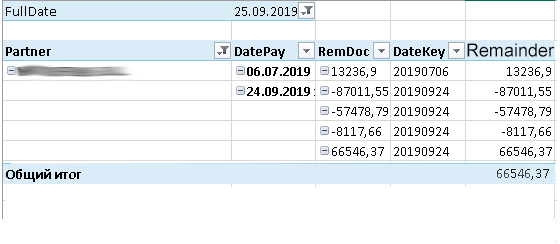
that false. Would like to see the remainder from 12885,82625 as of 04.12.2019
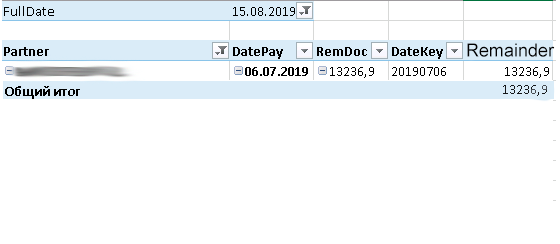
More samples as I want to see:
I try next queries, but nothing correct worked:
Remainder:=
var a = CALCULATE(LASTNONBLANK('Table1'[RemDoc], 1),
FILTER(ALL('Date'),'Date'[DateKey] <= MAX('Table1'[DateKey])))
var b = IF((a<=0),0)
return a
******
Remainder:=
var suma = CALCULATE (SUM('Table1'[RemDoc]),
FILTER (ALL('Date'),'Date'[DateKey] <= MAX('Table1'[DateKey])))
var rem = IF((suma<0),0,suma)
return rem
******
Остаток:=
SUMX (VALUES ('Table1'[Partner]),
VAR LastBalanceDate = CALCULATE ( MAX ( Table1'[DateKey] ) )
RETURN
CALCULATE (
SUM ('Table1'[RemDoc]),
'Date'[DateKey] >= LastBalanceDate))
****
How to achieve the desired result?
Thanks for your helps.
Solved! Go to Solution.
Hi @Anonymous
I think you can add an index column in Power Query Editor.
My Sample:
Group all rows by DateKey column, then add an index column by custom column.
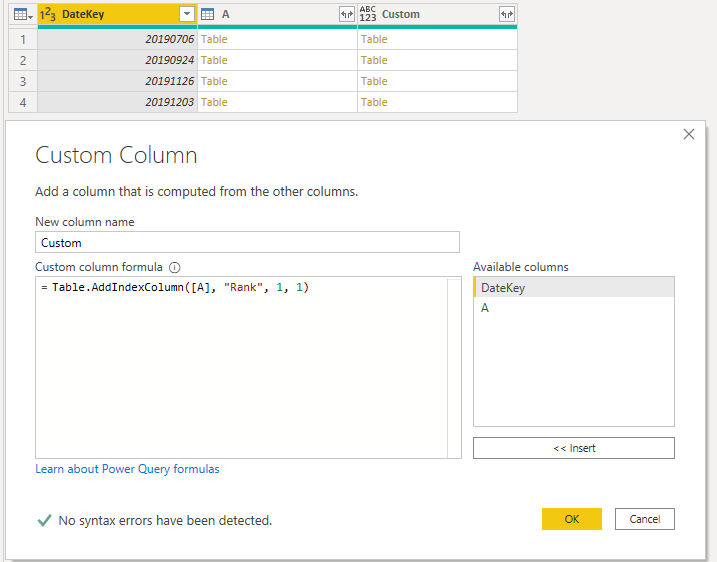
Expand all column in Custom and remove other columns.
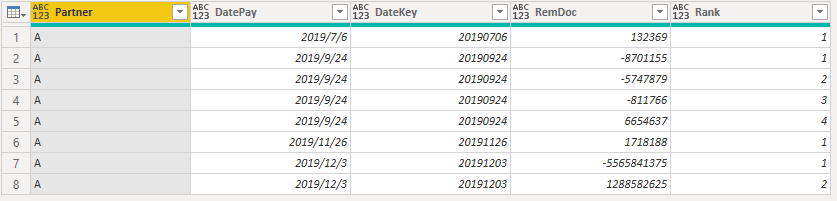
Build a calendar table for slicer.
Calendar = CALENDARAUTO()
Then build a measure filter and Remainder measure.
Filter = IF(MAX('Table'[DatePay])<=SELECTEDVALUE('Calendar'[Date]),1,0)Remainder =
VAR _MaxDate = MAXX(FILTER(ALL('Table'),'Table'[Partner]=MAX('Table'[Partner])&&'Table'[DatePay]<=SELECTEDVALUE('Calendar'[Date])),'Table'[DatePay])
VAR _MaxIndex = MAXX(FILTER(ALL('Table'),'Table'[Partner]=MAX('Table'[Partner])&&'Table'[DatePay] = _MaxDate),'Table'[Rank])
RETURN
IF(HASONEVALUE('Table'[DateKey]),SUM('Table'[RemDoc]),SUMX(FILTER(ALL('Table'),'Table'[Partner]=MAX('Table'[Partner])&&'Table'[DatePay] = _MaxDate&&'Table'[Rank]=_MaxIndex),'Table'[RemDoc]))
Result is as below.
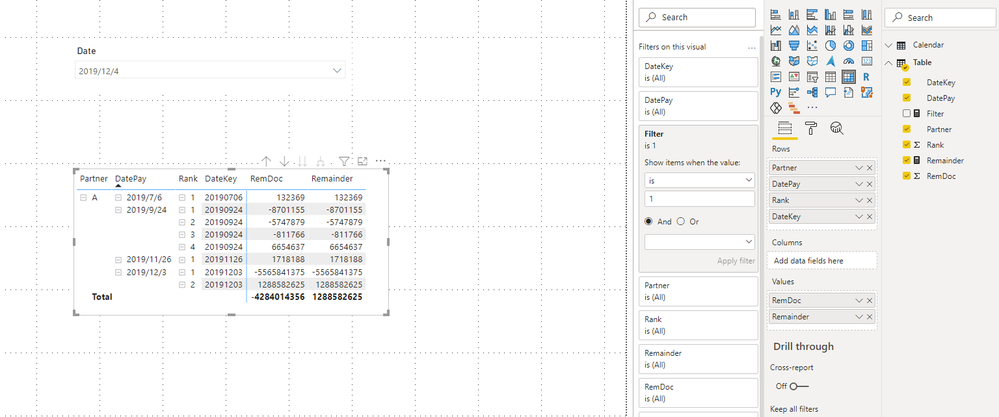
You can download the pbix file from this link: File
Best Regards,
Rico Zhou
If this post helps, then please consider Accept it as the solution to help the other members find it more quickly.
Hi @Anonymous
I think you can add an index column in Power Query Editor.
My Sample:
Group all rows by DateKey column, then add an index column by custom column.
Expand all column in Custom and remove other columns.
Build a calendar table for slicer.
Calendar = CALENDARAUTO()
Then build a measure filter and Remainder measure.
Filter = IF(MAX('Table'[DatePay])<=SELECTEDVALUE('Calendar'[Date]),1,0)Remainder =
VAR _MaxDate = MAXX(FILTER(ALL('Table'),'Table'[Partner]=MAX('Table'[Partner])&&'Table'[DatePay]<=SELECTEDVALUE('Calendar'[Date])),'Table'[DatePay])
VAR _MaxIndex = MAXX(FILTER(ALL('Table'),'Table'[Partner]=MAX('Table'[Partner])&&'Table'[DatePay] = _MaxDate),'Table'[Rank])
RETURN
IF(HASONEVALUE('Table'[DateKey]),SUM('Table'[RemDoc]),SUMX(FILTER(ALL('Table'),'Table'[Partner]=MAX('Table'[Partner])&&'Table'[DatePay] = _MaxDate&&'Table'[Rank]=_MaxIndex),'Table'[RemDoc]))
Result is as below.
You can download the pbix file from this link: File
Best Regards,
Rico Zhou
If this post helps, then please consider Accept it as the solution to help the other members find it more quickly.
@Anonymous - Do you have any other indicator like an Index column to denote the "latest"?
The Power BI Data Visualization World Championships is back! Get ahead of the game and start preparing now!