

cancel
Showing results for 
Search instead for 
Did you mean: 

The Power BI Data Visualization World Championships is back! Get ahead of the game and start preparing now! Learn more

Reply
JDBOS
Helper III
Helper III

How do you distinguish between new workspaces and classic workspaces?

Our Power BI workspaces were created by someone who has left our organization.

How can you tell whether a Workspace is "new" or "classic"?

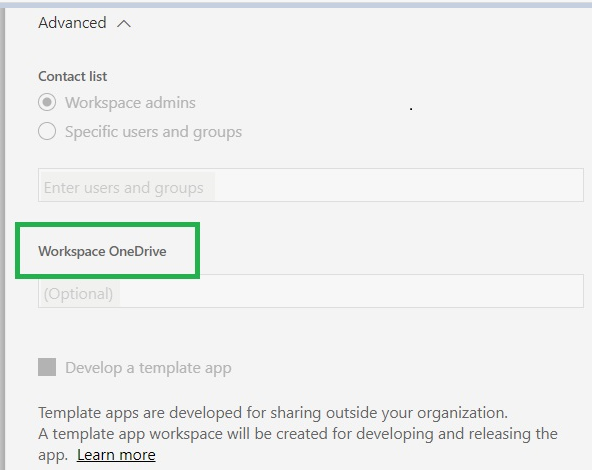
Looking in the Advanced section of the Settings for a workspace, I'm seeing a reference to OneDrive so I'm assuming they are "new": 

image.png

1 ACCEPTED SOLUTION
nickyvv
Most Valuable Professional

Hi @JDBOS


to clarify a bit:

This is an old workspace:

image.png

This is a new workspace:

image.png


So yours is a new workspace.


Did I answer your question? Mark my post as a solution!

Blog: nickyvv.com | @NickyvV


View solution in original post

6 REPLIES 6
Greg_Deckler
Community Champion
Community Champion

Easiest way to tell in my opinion.


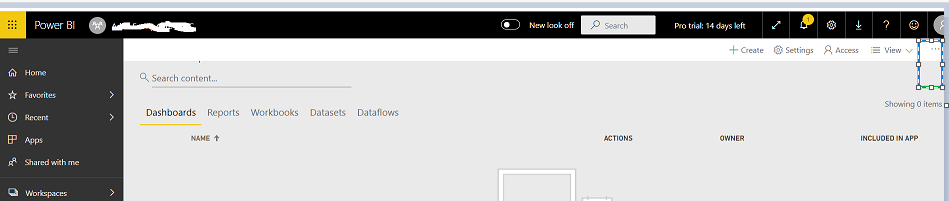
Go to the Workspace. In the upper left, click the ellipses. Next to Update App or Publish App. If you see Workspace access, it is new. If you see Members in the list, it is classic.


Follow on LinkedIn
@ me in replies or I'll lose your thread!!!
Instead of a Kudo, please vote for this idea
Become an expert!: Enterprise DNA
External Tools: MSHGQM
YouTube Channel!: Microsoft Hates Greg
Latest book!:
DAX For Humans

DAX is easy, CALCULATE makes DAX hard...

Thanks for the quick reply @Greg_Deckler  

Looking at the upper, I'm not seeing ellipses - although there is a set on the far right but they show Workplace Settings and Workplace Access.  Should I be looking at a different screen? 


image.png


Right, you have the ellipses highlighed in your image by a rectangle. Right, and you saw Workspace access in the list so new workspace.


Follow on LinkedIn
@ me in replies or I'll lose your thread!!!
Instead of a Kudo, please vote for this idea
Become an expert!: Enterprise DNA
External Tools: MSHGQM
YouTube Channel!: Microsoft Hates Greg
Latest book!:
DAX For Humans

DAX is easy, CALCULATE makes DAX hard...

As a new user, just figuring out where to find info given the different versions is challenging - but it all seems to make good sense.

And thanks again for all of your responses in the BPI Community - I look at yours first because they always insightful!

nickyvv
Most Valuable Professional

Hi @JDBOS


to clarify a bit:

This is an old workspace:

image.png

This is a new workspace:

image.png


So yours is a new workspace.


Did I answer your question? Mark my post as a solution!

Blog: nickyvv.com | @NickyvV


@nickyvv  thanks for your help!

Helpful resources

Announcements
Power BI DataViz World Championships

Power BI Dataviz World Championships

The Power BI Data Visualization World Championships is back! Get ahead of the game and start preparing now!

November Power BI Update Carousel

Power BI Monthly Update - November 2025

Check out the November 2025 Power BI update to learn about new features.

FabCon Atlanta 2026 carousel

FabCon Atlanta 2026

Join us at FabCon Atlanta, March 16-20, for the ultimate Fabric, Power BI, AI and SQL community-led event. Save $200 with code FABCOMM.