cancel
Showing results for 
Search instead for 
Did you mean: 

Next up in the FabCon + SQLCon recap series: The roadmap for Microsoft SQL and Maximizing Developer experiences in Fabric. All sessions are available on-demand after the live show. Register now

Reply
kanchanyadav
New Member

Help required with App sharing

Hi,


I need my user to have the access to reshare the app to other users. I have selected the checkbox "allow user to share the app and underlying dataset". However, in the app section under share option the user can only see two options -Embed Report and Generate a QR code. Can anyone help me with how this feature "allow user to share the app" works.


Thanks

1 ACCEPTED SOLUTION
v-cazheng-msft
Community Support
Community Support

Hi, @kanchanyadav 

Reshare permission will allow end users of the app to share the contents in this app, including the underlying datasets. If you check the option to 'allow users to reshare the app and the app’s underlying dataset using the share permission’, you can see the users with reshare permission on the dataset in original workspace.


You can see the difference by the following example.

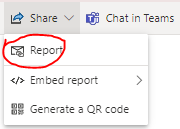
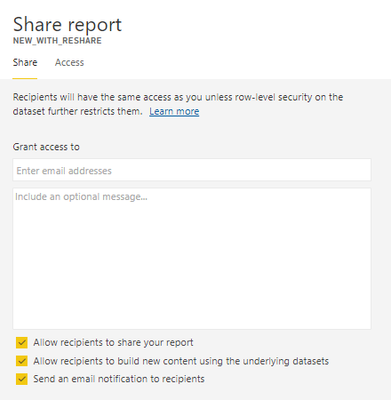
1 Save a copy of report from the app with reshare permission


v-cazheng-msft_0-1614822838613.png


v-cazheng-msft_1-1614822838614.png


v-cazheng-msft_2-1614822838617.png


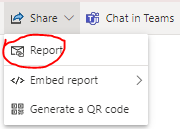
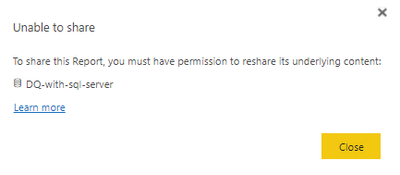
2 Save a copy of report from the app without reshare permission

v-cazheng-msft_3-1614822838618.png


v-cazheng-msft_4-1614822838618.png


v-cazheng-msft_5-1614822838619.png


Best Regards,

Caiyun Zheng


Is that the answer you're looking for? If this post helps, then please consider Accept it as the solution to help the other members find it more quickly.


View solution in original post

4 REPLIES 4
v-cazheng-msft
Community Support
Community Support

Hi, @kanchanyadav 

Reshare permission will allow end users of the app to share the contents in this app, including the underlying datasets. If you check the option to 'allow users to reshare the app and the app’s underlying dataset using the share permission’, you can see the users with reshare permission on the dataset in original workspace.


You can see the difference by the following example.

1 Save a copy of report from the app with reshare permission


v-cazheng-msft_0-1614822838613.png


v-cazheng-msft_1-1614822838614.png


v-cazheng-msft_2-1614822838617.png


2 Save a copy of report from the app without reshare permission

v-cazheng-msft_3-1614822838618.png


v-cazheng-msft_4-1614822838618.png


v-cazheng-msft_5-1614822838619.png


Best Regards,

Caiyun Zheng


Is that the answer you're looking for? If this post helps, then please consider Accept it as the solution to help the other members find it more quickly.


GilbertQ
Super User
Super User

Hi there


What that will allow users to be able to access the reports/dashboards directly from the link with the correct license.


Did I answer your question? Mark my post as a solution!

Proud to be a Super User!


Power BI Blog

GilbertQ
Super User
Super User

Hi @kanchanyadav 


If you are viewing a report from an App, you cannot share within the App.


You will have to ask the author of the app to share it with the other people?


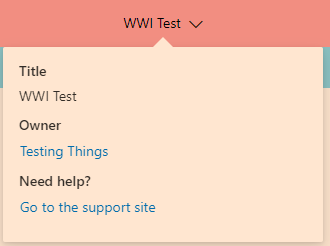
You can find the person whom to contact by clicking on the top of the app which will display their contact details as shown below with my example

GilbertQ_0-1614637927170.png


Did I answer your question? Mark my post as a solution!

Proud to be a Super User!


Power BI Blog

@GilbertQ  Thanks a lot Gilbert. In that case can you please help me understand the purpose of this checkbox and the rights a user gets if the checkbox is checked.

Helpful resources

Announcements
New to Fabric survey Carousel

New to Fabric Survey

If you have recently started exploring Fabric, we'd love to hear how it's going. Your feedback can help with product improvements.

Power BI DataViz World Championships carousel

Power BI DataViz World Championships - June 2026

A new Power BI DataViz World Championship is coming this June! Don't miss out on submitting your entry.

Join our Fabric User Panel

Join our Fabric User Panel

Share feedback directly with Fabric product managers, participate in targeted research studies and influence the Fabric roadmap.

March Power BI Update Carousel

Power BI Community Update - March 2026

Check out the March 2026 Power BI update to learn about new features.

Top Solution Authors