cancel
Showing results for 
Search instead for 
Did you mean: 

The Power BI Data Visualization World Championships is back! Get ahead of the game and start preparing now! Learn more

Reply
hlandrus
Advocate I
Advocate I

Group Workspace Request Access Email

My team is currently creating and sharing our dashboards from our group workspace. This has worked well since anyone on the team can access the data and manage any issues we might have. I just ran into a issue though that I'm not sure if it has a solution. If someone is given a link to a dashboard that is not shared with them they can click "request access". Now when this is done for a dashboard owned by an individual that individual gets an email. When this is done with a dashboard in a group workspace it seems that no one is getting an email. This has lead to a backlog of users requesting access and my team not having any idea that they are. Is there a way to specific who gets the email or can we get an email to the O365 group?

7 REPLIES 7
awright19
Advocate II
Advocate II

I'm having the same issue. Is there any way to get an actual notification outside of the share pop up for that particular dashboard/report?

Auribe_89
Regular Visitor

Hi, did you find any solution that can share? I am having the same problem

Are your UPNs the same like your E-Mails or do they differ?

Are your UPNs the same like your E-Mails or do they differ?

Reid_Havens
Most Valuable Professional

Hi there,


Happy to help. If you select the elipsis (...) next to the Group name in Power BI, and select Members it should take you to the O365 Member Page. From here you should see three tabs (All, Owners, Guests). If you want to add an owner to this group (E.g. a person who'll get a request email) then go to the "All" tab of members and select the elipsis (...) next to their name and click make owner. This should let you set up anyone who should get the approval emails for the group. Let me know if this solution works for you.

I went and doubled checked and I'm already an owner for the O365 group. Neither myself or the other owner is getting emailed when someone requests access to dashboards in the group workspace.  Thanks for the idea. 

Reid_Havens
Most Valuable Professional

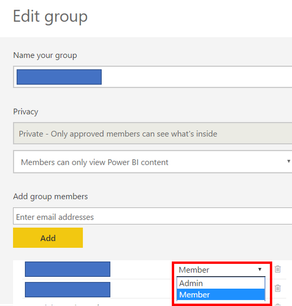
The other step to check (you might have already) is check to make sure you're also an admin in the Power BI page as well. If you select the same elepsis (...) next to the group on the PBI.com page and select "Edit Group" instead, you can set anyone there as a group admin. These are seperate settings from O365 Group ownership. Screenshot steps below,


Picture1.png

Picture2.png

Helpful resources

Announcements
Power BI DataViz World Championships

Power BI Dataviz World Championships

The Power BI Data Visualization World Championships is back! Get ahead of the game and start preparing now!

December 2025 Power BI Update Carousel

Power BI Monthly Update - December 2025

Check out the December 2025 Power BI Holiday Recap!

FabCon Atlanta 2026 carousel

FabCon Atlanta 2026

Join us at FabCon Atlanta, March 16-20, for the ultimate Fabric, Power BI, AI and SQL community-led event. Save $200 with code FABCOMM.