This time we’re going bigger than ever. Fabric, Power BI, SQL, AI and more. We're covering it all. You won't want to miss it.
Learn moreDid you hear? There's a new SQL AI Developer certification (DP-800). Start preparing now and be one of the first to get certified. Register now
Looking for a way to extract queries from data flows from PowerBI without keeping the formatted text that is pasted on there. When I try to simply copy and paste the query from the dataflow there are all different sorts of "#lf"s for example that are inherent to the format. Any way to extract just the raw queries?
Solved! Go to Solution.
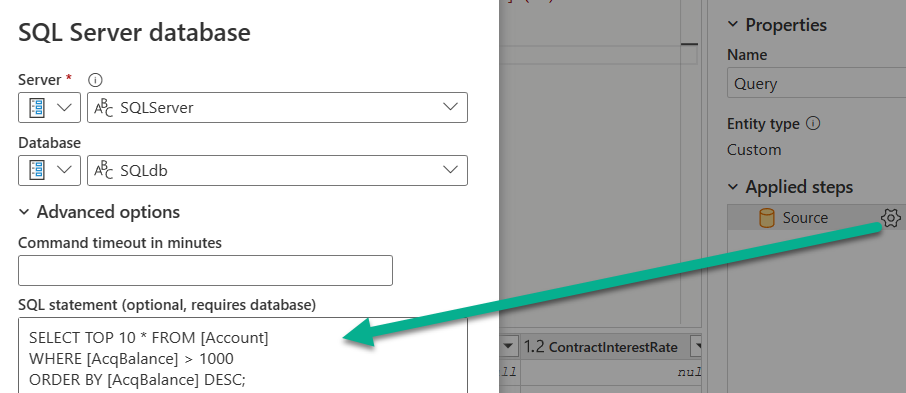
Yes, if you click the gear icon next to the source step, you'll see the original SQL query without the line feed characters:
Is your spoiler block meant to include a screenshot? It looks blank when I expand it.
Are you talking about native SQL queries in your dataflow's M code?
Yes, I'm talking about how when a query is inserted into a data flow and I then view the query's within the "edit tables" interface of the data flow, I am unable to see the native queries but only the queries with the data flow formatted characters inserted. Is there any away I can view the queries without the data flow formatted characters once they're in the data flow?
thanks
Yes, if you click the gear icon next to the source step, you'll see the original SQL query without the line feed characters:
Thanks so much!
Check out the April 2026 Power BI update to learn about new features.
If you have recently started exploring Fabric, we'd love to hear how it's going. Your feedback can help with product improvements.
| User | Count |
|---|---|
| 11 | |
| 9 | |
| 8 | |
| 8 | |
| 8 |
| User | Count |
|---|---|
| 49 | |
| 27 | |
| 25 | |
| 20 | |
| 20 |