cancel
Showing results for 
Search instead for 
Did you mean: 

The Power BI Data Visualization World Championships is back! Get ahead of the game and start preparing now! Learn more

Reply
nicolasf
Helper I
Helper I

Get Refresh History

Hello,


On my tenant, I'm Power BI administrator and Capacity administrator. But I am not administrator on each Workspace.

I need to see all refresh duration of all datasets of my power BI capacity, even if I'm not administrator on all workspaces.


I tried to get history refresh using the API "Datasets - Get Refresh History In Group", but it seems that I can not get history of datasets refresh  that I'm not the Workspace Administrator. And I can not use this with service principal.


Is there a way to get all history refresh without being workspace Administrator? Because I'm Power BI administrator and Capacity administrator on my tenant. 


Thanks for your feedback

1 ACCEPTED SOLUTION
Anonymous
Not applicable

Hi,@nicolasf 

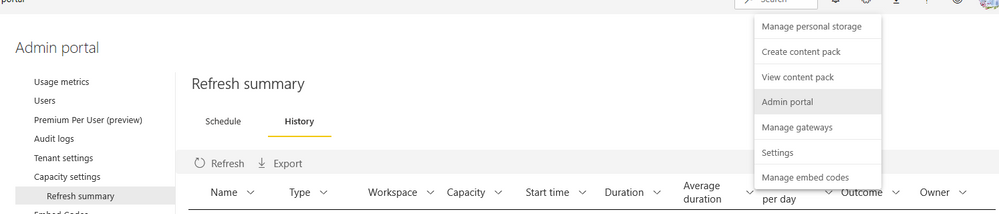
You may try it in admin portal > capacity settings > refresh summary.


Screenshot 2021-02-08 133158.png


For more information ,you can refer to this :

https://docs.microsoft.com/en-us/power-bi/connect-data/refresh-summaries

Hope it helps.


Best Regards,

Caitlyn Yan


If this post helps then please consider Accept it as the solution to help the other members find it more quickly.

View solution in original post

2 REPLIES 2
Anonymous
Not applicable

Hi,@nicolasf 

You may try it in admin portal > capacity settings > refresh summary.


Screenshot 2021-02-08 133158.png


For more information ,you can refer to this :

https://docs.microsoft.com/en-us/power-bi/connect-data/refresh-summaries

Hope it helps.


Best Regards,

Caitlyn Yan


If this post helps then please consider Accept it as the solution to help the other members find it more quickly.

nickyvv
Most Valuable Professional

Hi @nicolasf,

I think you want to use the following API:
Capacities - Get Refreshables For Capacity 

With the $expand option you can get related entities inline, e.g. groups (=workspaces). Have a look at the 2nd example.


Did I answer your question? Mark my post as a solution!

Blog: nickyvv.com | @NickyvV


Helpful resources

Announcements
Power BI DataViz World Championships

Power BI Dataviz World Championships

The Power BI Data Visualization World Championships is back! Get ahead of the game and start preparing now!

December 2025 Power BI Update Carousel

Power BI Monthly Update - December 2025

Check out the December 2025 Power BI Holiday Recap!

FabCon Atlanta 2026 carousel

FabCon Atlanta 2026

Join us at FabCon Atlanta, March 16-20, for the ultimate Fabric, Power BI, AI and SQL community-led event. Save $200 with code FABCOMM.