
Join us at FabCon Atlanta from March 16 - 20, 2026, for the ultimate Fabric, Power BI, AI and SQL community-led event. Save $200 with code FABCOMM.
Register now!Learn from the best! Meet the four finalists headed to the FINALS of the Power BI Dataviz World Championships! Register now
Hi All,
I need to get datasets id by name
In workspace avaialbel a lot of datasets, but I need to find datasets id specificly for one datasets by name.
$uri = https://api.powerbi.com/v1.0/myorg/groups/$groupId/datasets
$datasets = Invoke-RestMethod -Headers $header -Uri $uri -Method "GET"
$datasetsVal = $datasets.value
$datasetsId = $datasetsVal.id
Above script return all IDs. but I need get ID by name.
Thanks for help
Solved! Go to Solution.
Hi @Anonymous
Currently, there is no suitable REST API to retrieve the dataset ID according to the dataset name. You can search all the datasets under this workspace through the workspace ID, then export the results, and then return the dataset ID according to the dataset name.
https://docs.microsoft.com/en-us/rest/api/power-bi/datasets/get-datasets-in-group
If you are not sure of the workspace ID, you can get the dataset information of the entire organization through the following API, and then retrieve the dataset ID through the dataset name.
https://docs.microsoft.com/en-us/rest/api/power-bi/datasets/get-datasets
Best Regard
Community Support Team _ Ailsa Tao
Hi @Anonymous
Currently, there is no suitable REST API to retrieve the dataset ID according to the dataset name. You can search all the datasets under this workspace through the workspace ID, then export the results, and then return the dataset ID according to the dataset name.
https://docs.microsoft.com/en-us/rest/api/power-bi/datasets/get-datasets-in-group
If you are not sure of the workspace ID, you can get the dataset information of the entire organization through the following API, and then retrieve the dataset ID through the dataset name.
https://docs.microsoft.com/en-us/rest/api/power-bi/datasets/get-datasets
Best Regard
Community Support Team _ Ailsa Tao
You can try working it out via PowerShell if you want to
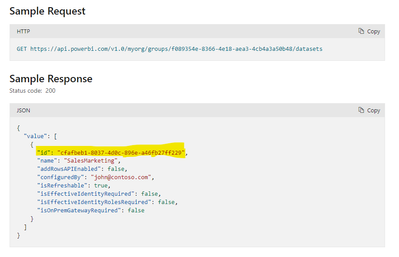
You can also try using this API to find all datasets and look for the one that you want:
https://api.powerbi.com/v1.0/myorg/groups/{groupId}/datasets
Get the output from above and then filter out based on name and use that id.
Share feedback directly with Fabric product managers, participate in targeted research studies and influence the Fabric roadmap.
Check out the February 2026 Power BI update to learn about new features.