Hi Team,
I already have done all this steps:
- I have my Tenant account properly setup in Azure - Done
- Allow Service Principal to use the API Services. - Done
- Add Tenant account to the Security groups with all privilages to read and write.- Done
- Add the Account to the Workspace as an Admin. - Done
I was successfully able to authenticate with powerbi client and get the Token Using PowerBI Rest API i was able to get the list of reports in the Workspa,but when I try to get the report (client.Reports.GenerateTokenInGroupAsync) I got the next error: "
Operation returned an invalid status code 'Forbidden'"
Below is my code Snippet:
To authenticate to Power BI using SPN
public PowerBIClient GetPowerBIClient(PowerBiSettings powerBiSettings)
{
Console.WriteLine("Creating an instance of the Client App with the Client Secret.");
IConfidentialClientApplication app = ConfidentialClientApplicationBuilder
.Create(powerBiSettings.PowerBIClientId.ToString())
.WithClientSecret(powerBiSettings.PowerBIClientSecret)
.WithAuthority(new Uri($"https://login.microsoftonline.com/{powerBiSettings.PowerBIAppTenantId.ToString()}"))
.Build();
// Use .default to get all the permissions available (those configured in AAD for this app)
string[] scopes = new string[] { $"{powerBiSettings.ResourceUrl}/.default" };
Microsoft.Identity.Client.AuthenticationResult result = null;
try
{
Console.WriteLine("Aquiring the bearer token using the Client App");
result = app.AcquireTokenForClient(scopes).ExecuteAsync().Result;
}
catch (MsalUiRequiredException ex)
{
// The application doesn't have sufficient permissions.
// - Did you declare enough app permissions during app creation?
// - Did the tenant admin grant permissions to the application?
Console.WriteLine("Exception - MsalUiRequired: " + ex.Message);
}
catch (MsalServiceException ex) when (ex.Message.Contains("AADSTS70011"))
{
// Invalid scope. The scope has to be in the form "https://resourceurl/.default"
// Mitigation: Change the scope to be as expected.
Console.WriteLine("Exception - MsalService: " + ex.Message);
}
catch (Exception ex)
{
Console.WriteLine("Error: " + ex.Message);
}
Console.WriteLine($"Obtained App-Only Access Token:\n{result.AccessToken}\n");
var tokenCredentials = new TokenCredentials(result.AccessToken, "Bearer");
Console.WriteLine("Creating the new Power BU client using the new bearer token.");
var _powerBIClient = new PowerBIClient(new Uri(powerBiSettings.ApiUrl), tokenCredentials);
return _powerBIClient;
}
To Generate the Embed Token :
var reports = client.Reports.GetReportsInGroupAsync(powerBiUserAccess.WorkspaceId).Result;
Microsoft.PowerBI.Api.V2.Models.Report report = null;
if (!string.IsNullOrEmpty(reportId))
{
report = reports.Value.FirstOrDefault(r => r.Id == reportId);
if (report == null)
{
_logger.Error("No report found matching the ID provided. ReportId: {0}", reportId);
throw new IdInvalidException("No report found matching the ID provided.");
}
}
else
{
_logger.Error("No report ID provided.");
throw new IdMissingException("No report ID provided.");
}
GenerateTokenRequest generateTokenRequestParameters;
string accessLevel = Constants.PowerBiEmbeddedAccessType.View;
if (!string.IsNullOrEmpty(powerBiUserAccess.AccessLevel)
&& powerBiUserAccess.AccessLevel.ToLower() == Constants.TenantAccessRoles.Contributor)
{
accessLevel = Constants.PowerBiEmbeddedAccessType.View;
}
_logger.Trace("Generate Embed Token for Reports");
// Generate Embed Token for reports without effective identities.
generateTokenRequestParameters = new GenerateTokenRequest(accessLevel: accessLevel);
EmbedToken tokenResponse = null;
try
{
_logger.Trace("Generate token in group.");
tokenResponse = client.Reports.GenerateTokenInGroup(powerBiUserAccess.WorkspaceId, report.Id, generateTokenRequestParameters);
}
After sometime, we are facing the below issue when Embed toke is being generated.
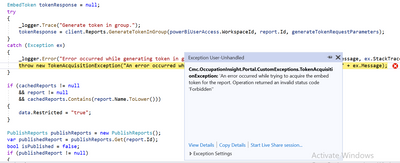
Please do the needful.
Thanks,
Swathi


