cancel
Showing results for 
Search instead for 
Did you mean: 

The Power BI Data Visualization World Championships is back! Get ahead of the game and start preparing now! Learn more

Reply
Anonymous
Not applicable

Gateway problem

Hi


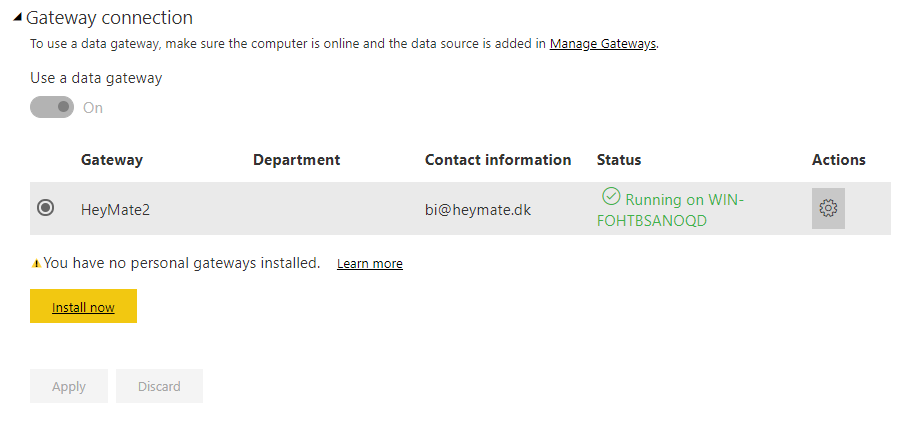
I have installed an on-premisis gateway- It is online and all connections are online too:


GatewayGateway

I am using this gateway to refresh, and everything seems fine:


Udklip2.PNG


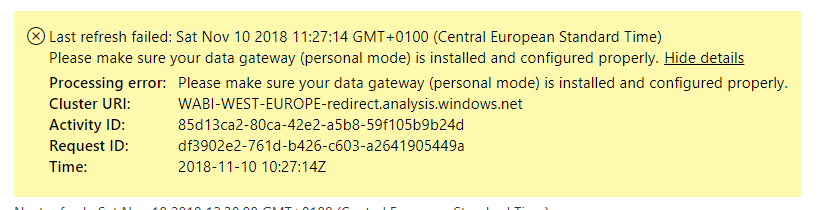
But when I try to refresh, I get an error, saying that my PERSONAL gateway is offline:


ErrorError


Everything worked until November 8th. I have been running good for over a year, but suddenly this happens. 

Does anybody know why? And how to resolve the issue?


Thanks!

2 ACCEPTED SOLUTIONS
v-danhe-msft
Microsoft Employee
Microsoft Employee

Hi @Anonymous,

Based on my research, I suggest you download the latest version of on-premises data gateway (personal mode)(Version:3000.0.144.3) in below link:https://www.microsoft.com/en-us/download/details.aspx?id=55768

And reset your configuration of your personal getway and refresh your reprot to test again.


Regards,

Daniel He


Community Support Team _ Daniel He
If this post helps, then please consider Accept it as the solution to help the other members find it more quickly.

View solution in original post

GilbertQ
Super User
Super User

Hi @Anonymous


It could be failing because it is an older version of the Gateway, whilst you have updated the version of Power BI Desktop.


So there will be a mismatch between your Gateway's mashup engine and your Power BI Desktop Mashup Engine.


By installing the latest version it should resolve this.


Did I answer your question? Mark my post as a solution!

Proud to be a Super User!


Power BI Blog

View solution in original post

4 REPLIES 4
v-danhe-msft
Microsoft Employee
Microsoft Employee

Hi @Anonymous,

Could you please tell me if your problem has been solved? If it is, could you please mark the helpful replies as Answered?


Regards,

Daniel He

Community Support Team _ Daniel He
If this post helps, then please consider Accept it as the solution to help the other members find it more quickly.
GilbertQ
Super User
Super User

Hi @Anonymous


It could be failing because it is an older version of the Gateway, whilst you have updated the version of Power BI Desktop.


So there will be a mismatch between your Gateway's mashup engine and your Power BI Desktop Mashup Engine.


By installing the latest version it should resolve this.


Did I answer your question? Mark my post as a solution!

Proud to be a Super User!


Power BI Blog

v-danhe-msft
Microsoft Employee
Microsoft Employee

Hi @Anonymous,

Based on my research, I suggest you download the latest version of on-premises data gateway (personal mode)(Version:3000.0.144.3) in below link:https://www.microsoft.com/en-us/download/details.aspx?id=55768

And reset your configuration of your personal getway and refresh your reprot to test again.


Regards,

Daniel He


Community Support Team _ Daniel He
If this post helps, then please consider Accept it as the solution to help the other members find it more quickly.
Seth_C_Bauer
Community Champion
Community Champion

@Anonymous When is the last time you updated the gateway?


Looking for more Power BI tips, tricks & tools? Check out PowerBI.tips the site I co-own with Mike Carlo. Also, if you are near SE WI? Join our PUG Milwaukee Brew City PUG

Helpful resources

Announcements
Power BI DataViz World Championships

Power BI Dataviz World Championships

The Power BI Data Visualization World Championships is back! Get ahead of the game and start preparing now!

December 2025 Power BI Update Carousel

Power BI Monthly Update - December 2025

Check out the December 2025 Power BI Holiday Recap!

FabCon Atlanta 2026 carousel

FabCon Atlanta 2026

Join us at FabCon Atlanta, March 16-20, for the ultimate Fabric, Power BI, AI and SQL community-led event. Save $200 with code FABCOMM.