cancel
Showing results for 
Search instead for 
Did you mean: 

The Power BI Data Visualization World Championships is back! Get ahead of the game and start preparing now! Learn more

Reply
techvidya
Frequent Visitor

Gateway Refresh Error

Hi all,


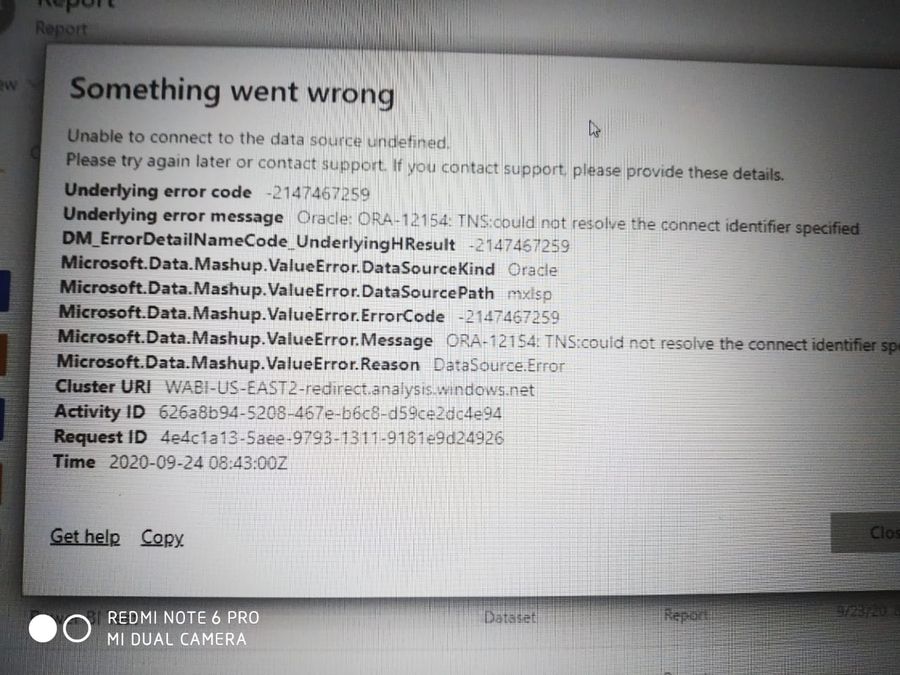
Iam facing this Error when iam trying to refresh my data in Power BI service through On-Premise gateway.


My Datsource ius ORACLE

58184a07-1758-4f30-b894-e4fbaaf4ed6e.jpg


Help me to Resolve this issue

1 ACCEPTED SOLUTION
Anonymous
Not applicable

Hi @techvidya ,


Check the document below.

https://docs.microsoft.com/en-us/power-bi/connect-data/service-gateway-onprem-manage-oracle#troubles... 

Troubleshooting

You might encounter any of several errors from Oracle when the naming syntax is either incorrect or not configured properly:

  • ORA-12154: TNS:could not resolve the connect identifier specified.
  • ORA-12514: TNS:listener does not currently know of service requested in connect descriptor.
  • ORA-12541: TNS:no listener.
  • ORA-12170: TNS:connect timeout occurred.
  • ORA-12504: TNS:listener was not given the SERVICE_NAME in CONNECT_DATA.

These errors might occur if the Oracle client either isn't installed or isn't configured properly. If it's installed, verify that the tnsnames.ora file is properly configured and you're using the proper net_service_name. You also need to make sure that the net_service_name is the same between the machine that uses Power BI Desktop and the machine that runs the gateway. For more information, see Install the Oracle client.

You might also encounter a compatibility issue between the Oracle server version and the Oracle Data Access Client version. Typically, you want these versions to match, as some combinations are incompatible. For instance, ODAC 12.x does not support Oracle Server version 9.

For diagnosing connectivity issues between the data source server and the Gateway machine, we recommend installing a client(such as PowerBI Desktop or Oracle ODBC Test) on the gateway machine. You can use the client to check connectivity to the data source server.

For additional troubleshooting information that relates to the gateway, see Troubleshooting the on-premises data gateway.


Best Regards,

Jay

View solution in original post

1 REPLY 1
Anonymous
Not applicable

Hi @techvidya ,


Check the document below.

https://docs.microsoft.com/en-us/power-bi/connect-data/service-gateway-onprem-manage-oracle#troubles... 

Troubleshooting

You might encounter any of several errors from Oracle when the naming syntax is either incorrect or not configured properly:

  • ORA-12154: TNS:could not resolve the connect identifier specified.
  • ORA-12514: TNS:listener does not currently know of service requested in connect descriptor.
  • ORA-12541: TNS:no listener.
  • ORA-12170: TNS:connect timeout occurred.
  • ORA-12504: TNS:listener was not given the SERVICE_NAME in CONNECT_DATA.

These errors might occur if the Oracle client either isn't installed or isn't configured properly. If it's installed, verify that the tnsnames.ora file is properly configured and you're using the proper net_service_name. You also need to make sure that the net_service_name is the same between the machine that uses Power BI Desktop and the machine that runs the gateway. For more information, see Install the Oracle client.

You might also encounter a compatibility issue between the Oracle server version and the Oracle Data Access Client version. Typically, you want these versions to match, as some combinations are incompatible. For instance, ODAC 12.x does not support Oracle Server version 9.

For diagnosing connectivity issues between the data source server and the Gateway machine, we recommend installing a client(such as PowerBI Desktop or Oracle ODBC Test) on the gateway machine. You can use the client to check connectivity to the data source server.

For additional troubleshooting information that relates to the gateway, see Troubleshooting the on-premises data gateway.


Best Regards,

Jay
Helpful resources

Announcements
Power BI DataViz World Championships

Power BI Dataviz World Championships

The Power BI Data Visualization World Championships is back! Get ahead of the game and start preparing now!

December 2025 Power BI Update Carousel

Power BI Monthly Update - December 2025

Check out the December 2025 Power BI Holiday Recap!

FabCon Atlanta 2026 carousel

FabCon Atlanta 2026

Join us at FabCon Atlanta, March 16-20, for the ultimate Fabric, Power BI, AI and SQL community-led event. Save $200 with code FABCOMM.