cancel
Showing results for 
Search instead for 
Did you mean: 

Learn from the best! Meet the four finalists headed to the FINALS of the Power BI Dataviz World Championships! Register now

Reply
tameemyousaf
Helper I
Helper I

Gateway Issue

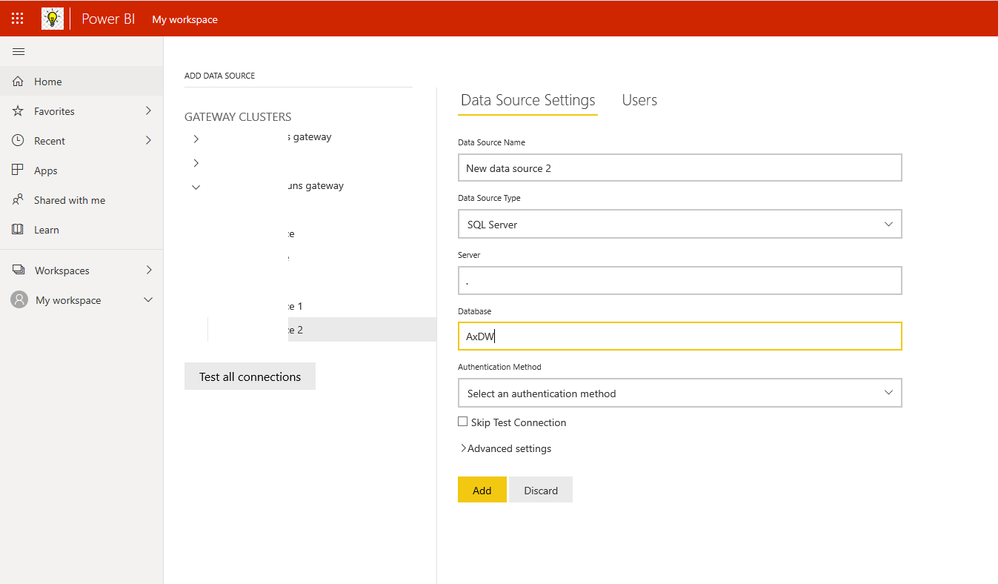
Hi, I have develped a report in Power BI desktop using entity store database (AxDW) database. I have given the server name ".". I deployed the report on Power BI servive using the documentation of microsoft. I followed below link:


https://docs.microsoft.com/en-us/archive/blogs/dynamicsaxbi/authoring-and-distributing-power-bi-repo...


After the deployment I am having below issue. I am using D365 FinOps cloud.


tameemyousaf_0-1602048860535.png


 Can anyone help in resolving the issue?

3 REPLIES 3
Anonymous
Not applicable

Hi @tameemyousaf ,


I saw in the blog you shared, the way to connect to the data source is through SQL SERVER. You may try to install the gateway on the machine you are operating and add the data source by selecting SQL SERVER in the gateway as follows.

1.png


Best Regards,

Stephen Tao


If this post helps, then please consider Accept it as the solution to help the other members find it more quickly.

Fowmy
Super User
Super User

@tameemyousaf 

You need to set a Gateway for your data source, please refer to this article:

https://docs.microsoft.com/en-us/data-integration/gateway/service-gateway-install

________________________

If my answer was helpful, please consider Accept it as the solution to help the other members find it

Click on the Thumbs-Up icon if you like this reply 🙂

YouTube  LinkedIn

Did I answer your question? Mark my post as a solution! and hit thumbs up


Subscribe and learn Power BI from these videos

Website LinkedIn PBI User Group

Hi @Fowmy


Thanks for the response. The issue is I am not using on-Prim database so why and on which machine I need to install the gateway? 

Helpful resources

Announcements
Join our Fabric User Panel

Join our Fabric User Panel

Share feedback directly with Fabric product managers, participate in targeted research studies and influence the Fabric roadmap.

February Power BI Update Carousel

Power BI Monthly Update - February 2026

Check out the February 2026 Power BI update to learn about new features.

FabCon Atlanta 2026 carousel

FabCon Atlanta 2026

Join us at FabCon Atlanta, March 16-20, for the ultimate Fabric, Power BI, AI and SQL community-led event. Save $200 with code FABCOMM.