cancel
Showing results for 
Search instead for 
Did you mean: 

Vote for your favorite vizzies from the Power BI Dataviz World Championship submissions. Vote now!

Reply
Anonymous
Not applicable

Gateway Connection Required Despite Getting Content from Azure Database

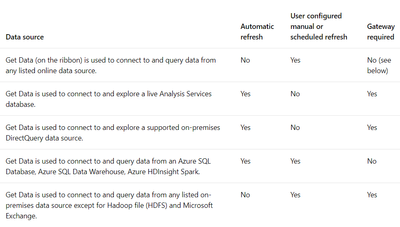
My coworker is able to publish our report that imports data from Azure SQL database as am I. I use the same data but in a different report however when I publish my report I need a Gateway to schedule a refresh while he does not. This is weird because according to the Microsoft Document below, Azure SQL Database does not require a gateway:

gateway.PNG

The credentials I am using to access the data are the Database credentials. What could be the cause?


1 ACCEPTED SOLUTION
Anonymous
Not applicable

@Anonymous  Have you added any other data to the report? Another file, manually entered data, etc? Or is it specifically just using the Azure SQL DB data?

View solution in original post

2 REPLIES 2
Anonymous
Not applicable

@Anonymous  Have you added any other data to the report? Another file, manually entered data, etc? Or is it specifically just using the Azure SQL DB data?

Anonymous
Not applicable

Hi,

Actually, yes. I just realized that it probably was the excel file located on my hard drive. Thank you for your response.


Thanks!

Helpful resources

Announcements
Power BI DataViz World Championships

Power BI Dataviz World Championships

Vote for your favorite vizzies from the Power BI World Championship submissions!

Sticker Challenge 2026 Carousel

Join our Community Sticker Challenge 2026

If you love stickers, then you will definitely want to check out our Community Sticker Challenge!

January Power BI Update Carousel

Power BI Monthly Update - January 2026

Check out the January 2026 Power BI update to learn about new features.

FabCon Atlanta 2026 carousel

FabCon Atlanta 2026

Join us at FabCon Atlanta, March 16-20, for the ultimate Fabric, Power BI, AI and SQL community-led event. Save $200 with code FABCOMM.