This time we’re going bigger than ever. Fabric, Power BI, SQL, AI and more. We're covering it all. You won't want to miss it.
Learn moreLevel up your Power BI skills this month - build one visual each week and tell better stories with data! Get started
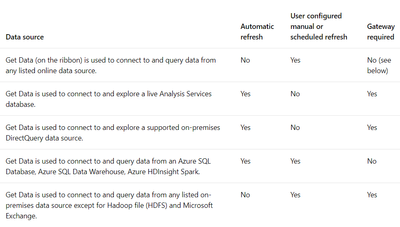
My coworker is able to publish our report that imports data from Azure SQL database as am I. I use the same data but in a different report however when I publish my report I need a Gateway to schedule a refresh while he does not. This is weird because according to the Microsoft Document below, Azure SQL Database does not require a gateway:
The credentials I am using to access the data are the Database credentials. What could be the cause?
Solved! Go to Solution.
@Anonymous Have you added any other data to the report? Another file, manually entered data, etc? Or is it specifically just using the Azure SQL DB data?
Hi,
Actually, yes. I just realized that it probably was the excel file located on my hard drive. Thank you for your response.
Thanks!
Check out the April 2026 Power BI update to learn about new features.
Sign up to receive a private message when registration opens and key events begin.
If you have recently started exploring Fabric, we'd love to hear how it's going. Your feedback can help with product improvements.
| User | Count |
|---|---|
| 11 | |
| 9 | |
| 8 | |
| 6 | |
| 6 |
| User | Count |
|---|---|
| 41 | |
| 27 | |
| 25 | |
| 22 | |
| 22 |