FabCon is coming to Atlanta
Join us at FabCon Atlanta from March 16 - 20, 2026, for the ultimate Fabric, Power BI, AI and SQL community-led event. Save $200 with code FABCOMM.
Register now!- Power BI forums
- Get Help with Power BI
- Desktop
- Service
- Report Server
- Power Query
- Mobile Apps
- Developer
- DAX Commands and Tips
- Custom Visuals Development Discussion
- Health and Life Sciences
- Power BI Spanish forums
- Translated Spanish Desktop
- Training and Consulting
- Instructor Led Training
- Dashboard in a Day for Women, by Women
- Galleries
- Data Stories Gallery
- Themes Gallery
- Contests Gallery
- QuickViz Gallery
- Quick Measures Gallery
- Visual Calculations Gallery
- Notebook Gallery
- Translytical Task Flow Gallery
- TMDL Gallery
- R Script Showcase
- Webinars and Video Gallery
- Ideas
- Custom Visuals Ideas (read-only)
- Issues
- Issues
- Events
- Upcoming Events
The Power BI Data Visualization World Championships is back! Get ahead of the game and start preparing now! Learn more
- Power BI forums
- Forums
- Get Help with Power BI
- Service
- Re: Format Painter not working with new update
- Subscribe to RSS Feed
- Mark Topic as New
- Mark Topic as Read
- Float this Topic for Current User
- Bookmark
- Subscribe
- Printer Friendly Page

- Mark as New
- Bookmark
- Subscribe
- Mute
- Subscribe to RSS Feed
- Permalink
- Report Inappropriate Content
Format Painter not working with new update
Hi,
I updated the power BI version released in October and since then, we realized that the format painter isn't working. This makes formatting a real problem. Any solutions?
Solved! Go to Solution.
- Mark as New
- Bookmark
- Subscribe
- Mute
- Subscribe to RSS Feed
- Permalink
- Report Inappropriate Content
Hi @Anonymous ,
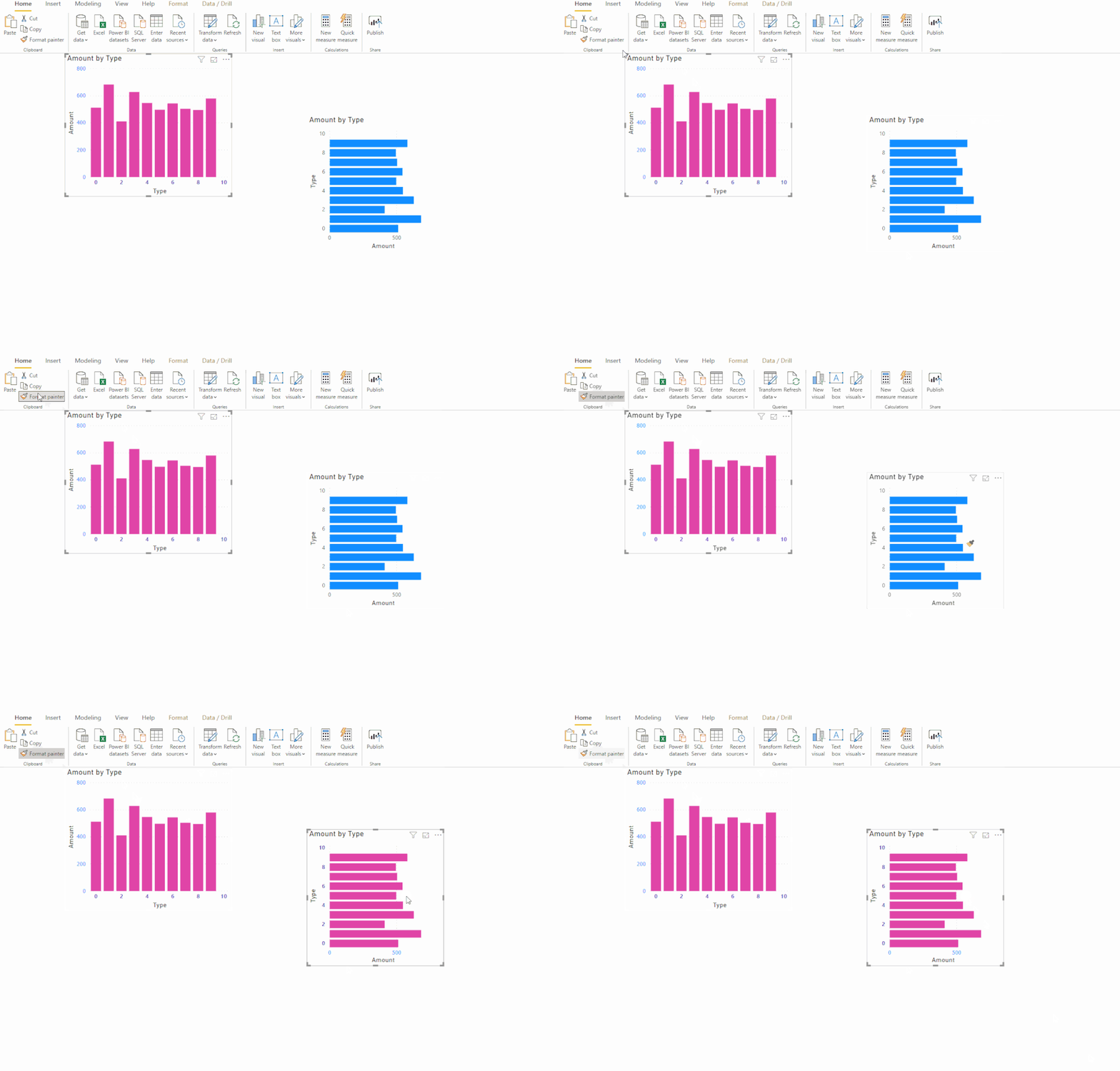
I test with a few scenarios but the format painter seems not works for type custom visuals. (official visuals[same type and different type]: succeed, official to custom: fail, custom visuals[same type and different type]: fail)
According to the test result, I think the format painter may not work on custom visuals.
Regards,
XIaoxin Sheng


- Mark as New
- Bookmark
- Subscribe
- Mute
- Subscribe to RSS Feed
- Permalink
- Report Inappropriate Content
@Anonymous Are you referring to adding custom colors? I ran into this yesterday and it appears that it just kicks you out if you include the "#" in the hex code. If you use only the number and paste that in, it takes it and works.
Looking for more Power BI tips, tricks & tools? Check out PowerBI.tips the site I co-own with Mike Carlo. Also, if you are near SE WI? Join our PUG Milwaukee Brew City PUG
- Mark as New
- Bookmark
- Subscribe
- Mute
- Subscribe to RSS Feed
- Permalink
- Report Inappropriate Content
Hi @Seth ,
I really appreciate your help.
I haven't used any custom colors. I just used the card visual across a page with different visuals interacting with it (something I have been doing in various reports for a while to highlight the key numbers), and when I tried just copying the format from one to another, I saw that the paintbrush icon which should show up on clicking the format painter is not showing up, and this happened during the first report I started working on after the update.
Any ideas on what might be causing this?
- Mark as New
- Bookmark
- Subscribe
- Mute
- Subscribe to RSS Feed
- Permalink
- Report Inappropriate Content
Hi @Anonymous ,
What version of power bi desktop are you test? Can you please share a sample pbix file for test?
BTW, I test with 2.75.5649.582 64-bit (November 2019) and the painter works well. (windows store version)

Regards,
Xiaoxin Sheng
- Mark as New
- Bookmark
- Subscribe
- Mute
- Subscribe to RSS Feed
- Permalink
- Report Inappropriate Content
Thank you for the detailed explanations @Anonymous and @Seth_C_Bauer
The best possible solution to this problem is keeping an eye out on imported visuals (from the market place or external downloads) as their compatibility may change with updates. I have started emphasizing more on visuals which imply verified visuals by Microsoft or not updating power BI unless I am completely done with a dashboard so I don't have to make major changes in case the formatting breaks.
- Mark as New
- Bookmark
- Subscribe
- Mute
- Subscribe to RSS Feed
- Permalink
- Report Inappropriate Content
Hi @Anonymous ,
Turns out that format painter wasn't working only with additional visuals from the marketplace. Not something usual, the visual I was using was a timeline 2.1.1 slicer. This is still not working for some reason though I just copied and pasted the slicer across with changes in data manually for now.
- Mark as New
- Bookmark
- Subscribe
- Mute
- Subscribe to RSS Feed
- Permalink
- Report Inappropriate Content
Hi @Anonymous ,
I test with a few scenarios but the format painter seems not works for type custom visuals. (official visuals[same type and different type]: succeed, official to custom: fail, custom visuals[same type and different type]: fail)
According to the test result, I think the format painter may not work on custom visuals.
Regards,
XIaoxin Sheng
- Mark as New
- Bookmark
- Subscribe
- Mute
- Subscribe to RSS Feed
- Permalink
- Report Inappropriate Content
Agreed @Anonymous , The best way to go about using custom visuals would be to copy them and carefully replace any values depending on the requirements and checking that the filters affecting the visual are managed as well. These do slow down the report building though.
Helpful resources

Power BI Dataviz World Championships
The Power BI Data Visualization World Championships is back! Get ahead of the game and start preparing now!

Power BI Monthly Update - December 2025
Check out the December 2025 Power BI Holiday Recap!

FabCon Atlanta 2026
Join us at FabCon Atlanta, March 16-20, for the ultimate Fabric, Power BI, AI and SQL community-led event. Save $200 with code FABCOMM.


| User | Count |
|---|---|
| 56 | |
| 55 | |
| 31 | |
| 17 | |
| 14 |


