
Join us at FabCon Atlanta from March 16 - 20, 2026, for the ultimate Fabric, Power BI, AI and SQL community-led event. Save $200 with code FABCOMM.
Register now!The Power BI Data Visualization World Championships is back! Get ahead of the game and start preparing now! Learn more
I need to calculate First status of Id
ID Status
12 ----------active
12----------updated2
12---------failed
22-------rejected
33--------updtaed1
33--------updated2
Result should be
12 ----------active
22-------rejected
33--------updtaed1
Solved! Go to Solution.
Hi @Anonymous
Thanks for reaching out to us.
You can try this,
or if there is date/index column in that table, you can try
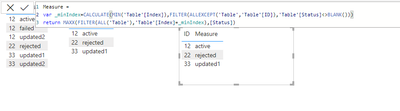
Measure =
var _minIndex=CALCULATE(MIN('Table'[Index]),FILTER(ALLEXCEPT('Table','Table'[ID]),'Table'[Status]<>BLANK()))
return MAXX(FILTER(ALL('Table'),'Table'[Index]=_minIndex),[Status])
Best Regards,
Community Support Team _Tang
If this post helps, please consider Accept it as the solution to help the other members find it more quickly.
Hi @Anonymous
Thanks for reaching out to us.
You can try this,
or if there is date/index column in that table, you can try
Measure =
var _minIndex=CALCULATE(MIN('Table'[Index]),FILTER(ALLEXCEPT('Table','Table'[ID]),'Table'[Status]<>BLANK()))
return MAXX(FILTER(ALL('Table'),'Table'[Index]=_minIndex),[Status])
Best Regards,
Community Support Team _Tang
If this post helps, please consider Accept it as the solution to help the other members find it more quickly.
@Anonymous - Try the below and let me know if it works.
CALCULATE (
FIRSTNONBLANK ( LookupTable[Status], TRUE () ),
FILTER (
LookupTable,
LookupTable[ID] = TargetTable[ID] )
)
)
Did I answer your question? Mark my post as a solution! If not, please feel free to ask me.
Also, I would ❤ Kudos if my solution helped. It is a token of appreciation!
Thank you very much !
The Power BI Data Visualization World Championships is back! Get ahead of the game and start preparing now!
| User | Count |
|---|---|
| 56 | |
| 55 | |
| 32 | |
| 18 | |
| 14 |