Join us at FabCon Atlanta from March 16 - 20, 2026, for the ultimate Fabric, Power BI, AI and SQL community-led event. Save $200 with code FABCOMM.
Register now!Get Fabric Certified for FREE during Fabric Data Days. Don't miss your chance! Request now
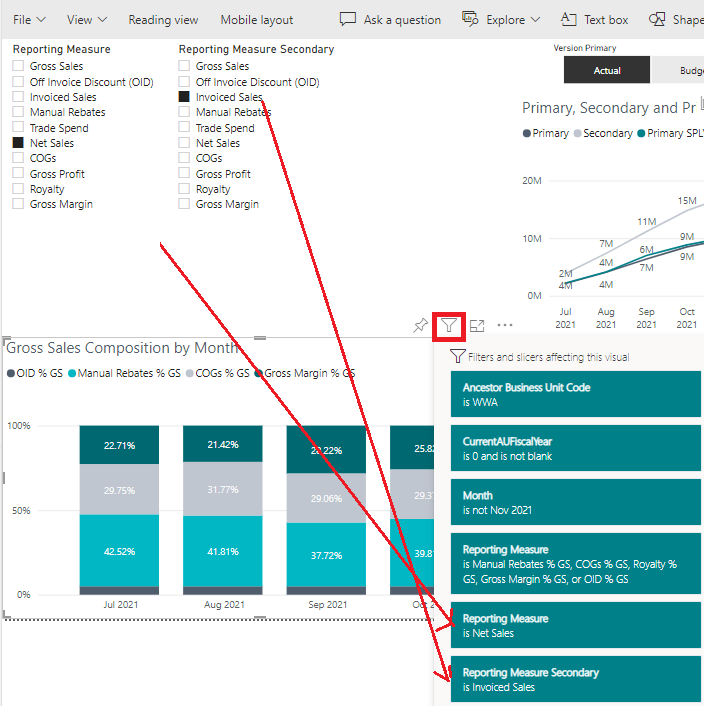
Found a strange bug recently, where the filters applied pop up displays the selection from slicers which are not affecting the visual.
This issue only happens in Power BI service - Power BI Desktop is working fine (i.e. the filters applied do not display slicers selections when interaction is set to none).
The scenario: 2 slicers at the top (Reporting Measure and Reporting Measure Secondary) have the interactions set to "none" against the stacked column chart "Gross Sales Composition by Month", however when opening the pop up to display the filters applied, both slicers selection are displayed in the list.
The reporting measure selection in the column chart is achieved using visual level filters - the slicer selection is different and not affecting the results (this is working as expected).
Solved! Go to Solution.
Hi @AlexR ,
By my test, it does exactly as you said, I have submitted this issue in our internal group(ICM 274902680), if there is a reply, I will reply you as soon as possible.
Best Regards,
Community Support Team _ kalyj
Hi @AlexR ,
Hi @AlexR ,
By my test, it does exactly as you said, I have submitted this issue in our internal group(ICM 274902680), if there is a reply, I will reply you as soon as possible.
Best Regards,
Community Support Team _ kalyj
Check out the November 2025 Power BI update to learn about new features.
Advance your Data & AI career with 50 days of live learning, contests, hands-on challenges, study groups & certifications and more!