cancel
Showing results for 
Search instead for 
Did you mean: 

We've captured the moments from FabCon & SQLCon that everyone is talking about, and we are bringing them to the community, live and on-demand. Starts on April 14th. Register now

Reply
olondo
Frequent Visitor

Filter slicer does not scroll down correctly

Recently (since this week, 6 September 2021) we have troubles with a filter slicer on the browser. The type of browser does not matter. As well as google chrome as microsoft edge as mozilla firefox has the same problem. 


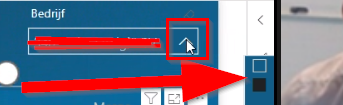
When we wants to select a value at the slicer, the scroll down options pops up at the right on the screen (instead of nicely below). The slicer option is at the right top of the screen so the options are not visible in the screen anymore:


olondo_0-1631261457207.png


We have tried a lot of things to solve this problem, but none of the things we tried helps:

  • Delete slicer and make it again
  • Try different browsers
  • Drag it a little bit to the left (slicer needs to be standing at the right top of the screen)
  • Publish the report again (we making use of the recent PowerBI update)
  • Try several format options 


For now, the temporary solution is to pop up the filter pane. Then we can see the first 5 characters of the text value.


Does anyone has the same troubles or has even found a solution to this?


Thanks in advantage

1 ACCEPTED SOLUTION
v-kkf-msft
Community Support
Community Support

Hi @olondo ,


Now Microsoft has fixed this issue in the Power BI Service, please check if your reports are working.


Best Regards,
Winniz

View solution in original post

5 REPLIES 5
v-kkf-msft
Community Support
Community Support

Hi @olondo ,


Now Microsoft has fixed this issue in the Power BI Service, please check if your reports are working.


Best Regards,
Winniz

Hi @v-kkf-msft 


The issue is fixed!! Thanks for replying to this topic.

And thanks to Microsoft for the quick help.


Best regards, olondo

edhans
Community Champion
Community Champion

Try setting your zoom level in the browser to 100%. I know there is an issue with the Chromium v93 used in Edge and Chromium, but the firefox issue makes it a bit odd. Still, try the 100% fix. MS knows about this and is working on it.


Did I answer your question? Mark my post as a solution!
Did my answers help arrive at a solution? Give it a kudos by clicking the Thumbs Up!

DAX is for Analysis. Power Query is for Data Modeling


Proud to be a Super User!

MCSA: BI Reporting
olondo
Frequent Visitor

Hi Edhans,


Thanks for the reply. For some colleagues which face this problem, the browser was standard on 100% zoom. In fact, if they change it to 90%, it works!


Not the real solution but it is temporarily workable. We will be waiting for the solution of Microsoft.

Hi @olondo ,


Microsoft has reported the problem, and the ID for ICM is 260227233. I will continue to follow up on the progress and show it in the post.


Best Regards,
Winniz

Helpful resources

Announcements
New to Fabric survey Carousel

New to Fabric Survey

If you have recently started exploring Fabric, we'd love to hear how it's going. Your feedback can help with product improvements.

Power BI DataViz World Championships carousel

Power BI DataViz World Championships - June 2026

A new Power BI DataViz World Championship is coming this June! Don't miss out on submitting your entry.

Join our Fabric User Panel

Join our Fabric User Panel

Share feedback directly with Fabric product managers, participate in targeted research studies and influence the Fabric roadmap.

March Power BI Update Carousel

Power BI Community Update - March 2026

Check out the March 2026 Power BI update to learn about new features.