Get certified for free when you join Fabric Data Days 2026 and dive into Fabric, Power BI, SQL, AI, and other essential data skills.
Join nowJuly 7 - July 17 | Round 2 of the Power BI Dataviz World Championships. Don't miss your chance! Learn more
I have been using Powr BI Desktop succesfully to access data from WebTuna. this has been using the WebTuna REST API with Basic authentication and a Key supplied by WebTuna. No isssues.
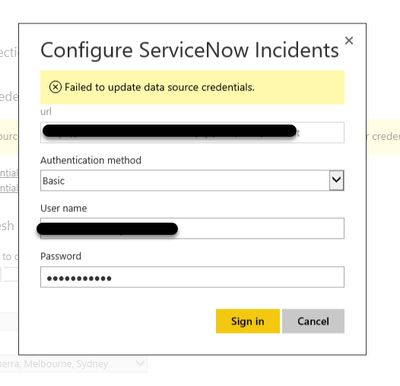
Application Performance have created and published a Content Pack for WebTuna. I can not gain access when loading the WebTuna Content Pack , I get 'Failed to update data source credentials.' when entering the same credentials as I am using in theh Desktop application.
My colleagues can load the content pack and access the data.
Can you provide any guidance or troubleshooing options?
Barry
Did we get a resolution for this.
I am able to connect to the API url using web connector from the desktop. However when I published the report, it is not refreshing when i go to schedule refresh. It is not recognising the credentials, when I enter it and I get "Failed to update data source credentials" error.
Since your colleagues can load the content pack and access the data properly, the issue should be related to setting associated with your account on WebTuna. Is there any setting on Web Tuna which can allow the service access from WebTuna to Power BI?
Please refer to a similar thread (connecting Azure SQL DW):
Regards,
Thank you Simon,
I have no issue/problem accessing WebTuna from Power BI Desktop application. Method of access with REST/API and ID and password is the same with the content pack but only get error message 'Failed to update data source credentials.'. The message is not ' Access denied'.
Many thanks
Barry
Join us in Barcelona for FabCon and SQLCon, the Fabric, Power BI, SQL, and AI community event. Save €200 with code FABCMTY200.
Join Fabric Data Days 2026: 60 days of free live/on-demand sessions, challenges, study groups, and certification opportunities.
| User | Count |
|---|---|
| 22 | |
| 12 | |
| 10 | |
| 10 | |
| 4 |
| User | Count |
|---|---|
| 31 | |
| 28 | |
| 26 | |
| 26 | |
| 21 |