This time we’re going bigger than ever. Fabric, Power BI, SQL, AI and more. We're covering it all. You won't want to miss it.
Learn moreDid you hear? There's a new SQL AI Developer certification (DP-800). Start preparing now and be one of the first to get certified. Register now
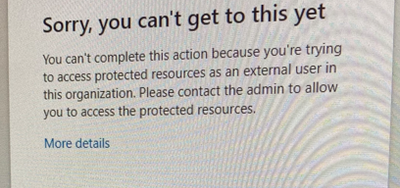
Hello- once an External Guest (already in authenticated in our AD) attempts to access a shared app- this error is experienced:
Error Code: 530004
Request Id: ad13b1d3-2bdd-4a92-8dd5-19d4a7d42400
Correlation Id: 7f91f9d2-bec1-4aaa-a490-61a0ccd01443
Timestamp: 2022-10-27T17:36:56.859Z
App name: Microsoft Power BI
App id: xxx
IP address: xxx
Device identifier: xx
Device platform: Windows 10
Device state: DomainJoined
Any ideas on the issue?
Solved! Go to Solution.
Hi @Gwalling
Do you have a screenshot of the error?
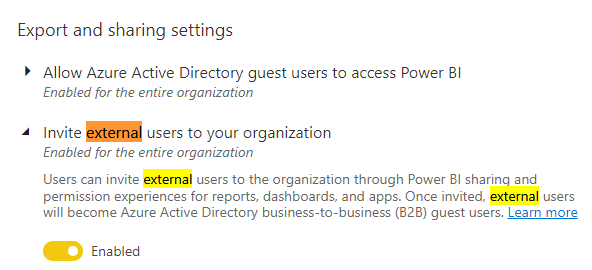
Also can you ask your Power BI Admin to make sure that External Sharing is allowed in the tenant settings?
Hi @Gwalling
Do you have a screenshot of the error?
Also can you ask your Power BI Admin to make sure that External Sharing is allowed in the tenant settings?
Our set-up in the PowerBI Admin Portal was set to allow External Guest Access for a specific Azure AD Security Group- not the "ENTIRE Organization". Solution was to add user to the Security Group.
Check out the April 2026 Power BI update to learn about new features.
If you have recently started exploring Fabric, we'd love to hear how it's going. Your feedback can help with product improvements.
| User | Count |
|---|---|
| 11 | |
| 10 | |
| 9 | |
| 8 | |
| 8 |
| User | Count |
|---|---|
| 49 | |
| 27 | |
| 25 | |
| 20 | |
| 20 |