
cancel
Showing results for 
Search instead for 
Did you mean: 

The Power BI Data Visualization World Championships is back! Get ahead of the game and start preparing now! Learn more

Reply
joseph248
Frequent Visitor

Expression Error

HI All,

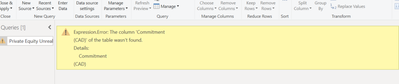
I am getting this expression error, I want to make changes to the header of the underlying excel data and changed the header, but now Power BI refresh is giving me this error, when I click on refresh.

joseph248_0-1604033169500.png

HOw do I make Power BI accept the new header title.

1 ACCEPTED SOLUTION
v-robertq-msft
Community Support
Community Support

Hi, @joseph248 

According to your description, you follow my steps:

  1. I make the same change as what you did, and I get the same problem, like this:

v-robertq-msft_0-1604051448155.png


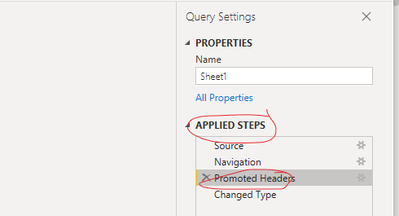
  1. Then I select the step before current step in the “Applied steps” on the right, like this:

v-robertq-msft_1-1604051448157.png


  1. I change the column to be consistent with the column name in Excel, like this:

屏幕截图 2020-10-30 175130.png


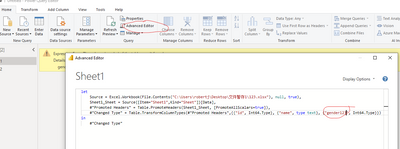
  1. I go to the “Advanced Editor” to change the column name in last step:

屏幕截图 2020-10-30 175219.png


And you can get what you want.


If this result is not what you want, you can post some sample data(without sensitive data) and your expected result.

How to Get Your Question Answered Quickly 


Best Regards,

Community Support Team _Robert Qin

If this post helps, then please consider Accept it as the solution to help the other members find it more quickly.

View solution in original post

1 REPLY 1
v-robertq-msft
Community Support
Community Support

Hi, @joseph248 

According to your description, you follow my steps:

  1. I make the same change as what you did, and I get the same problem, like this:

v-robertq-msft_0-1604051448155.png


  1. Then I select the step before current step in the “Applied steps” on the right, like this:

v-robertq-msft_1-1604051448157.png


  1. I change the column to be consistent with the column name in Excel, like this:

屏幕截图 2020-10-30 175130.png


  1. I go to the “Advanced Editor” to change the column name in last step:

屏幕截图 2020-10-30 175219.png


And you can get what you want.


If this result is not what you want, you can post some sample data(without sensitive data) and your expected result.

How to Get Your Question Answered Quickly 


Best Regards,

Community Support Team _Robert Qin

If this post helps, then please consider Accept it as the solution to help the other members find it more quickly.

Helpful resources

Announcements
Power BI DataViz World Championships

Power BI Dataviz World Championships

The Power BI Data Visualization World Championships is back! Get ahead of the game and start preparing now!

December 2025 Power BI Update Carousel

Power BI Monthly Update - December 2025

Check out the December 2025 Power BI Holiday Recap!

FabCon Atlanta 2026 carousel

FabCon Atlanta 2026

Join us at FabCon Atlanta, March 16-20, for the ultimate Fabric, Power BI, AI and SQL community-led event. Save $200 with code FABCOMM.