Share feedback directly with Fabric product managers, participate in targeted research studies and influence the Fabric roadmap.
Sign up nowGet Fabric certified for FREE! Don't miss your chance! Learn more
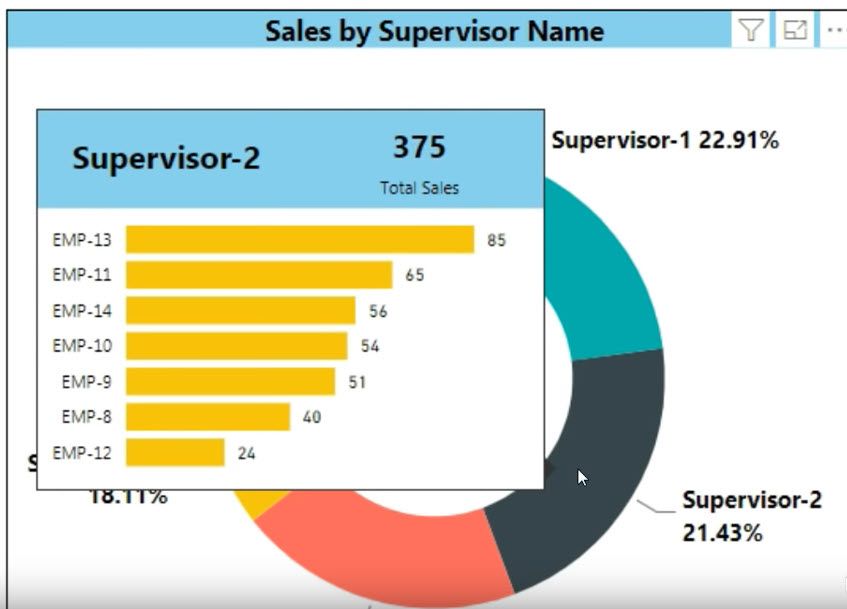
I have a tooltip set up to show a report but I'm wondering if there is anyway to then export the data from that report in the tooltips. I don't see a way to click on the tooltips and get the three dots to select export from.
For example, I'm wanting to export the data shown in the bar graph in this picture.
Solved! Go to Solution.
HI @Anonymous,
Currently, you can't use any advanced options on report tooltip panel.
Maybe you can setting it to a common report page with drill through filters to keep the current category and group effect and use the export feature on it.
Regards,
Xiaoxin Sheng
If you love stickers, then you will definitely want to check out our Community Sticker Challenge!
Check out the January 2026 Power BI update to learn about new features.
| User | Count |
|---|---|
| 19 | |
| 10 | |
| 8 | |
| 7 | |
| 7 |
| User | Count |
|---|---|
| 51 | |
| 43 | |
| 30 | |
| 27 | |
| 25 |