Get certified for free when you join Fabric Data Days 2026 and dive into Fabric, Power BI, SQL, AI, and other essential data skills.
Join nowJuly 7 - July 17 | Round 2 of the Power BI Dataviz World Championships. Don't miss your chance! Learn more
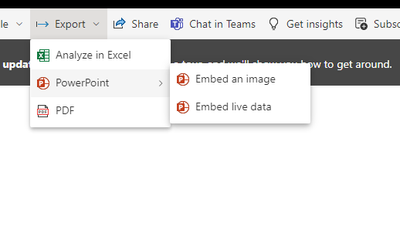
The export to powerpoint option exports the whole page as a image,
it is really difficult to read.
Is there an option to export one of the graph but not the whole page? (i have 5 graphs/charts in the same page)
Thank you.
Solved! Go to Solution.
Hi @tomcch ,
1.Reports in Power BI Service only support importing into the PPT in the following two ways, and you can't insert a single visual into the PPT
2.If you have related license, you can use the Add-ins: “Power BI Tiles” in PPT, you can refer to the following links
Integrating Power BI Tiles into Office documents | Microsoft Power BI Blog | Microsoft Power BI
Power BI Tiles Add-in in Power Point - Microsoft Power BI Community
Best Regards,
Xinru Zhu
If this post helps, then please consider Accept it as the solution to help the other members find it more quickly.
Hi @tomcch ,
1.Reports in Power BI Service only support importing into the PPT in the following two ways, and you can't insert a single visual into the PPT
2.If you have related license, you can use the Add-ins: “Power BI Tiles” in PPT, you can refer to the following links
Integrating Power BI Tiles into Office documents | Microsoft Power BI Blog | Microsoft Power BI
Power BI Tiles Add-in in Power Point - Microsoft Power BI Community
Best Regards,
Xinru Zhu
If this post helps, then please consider Accept it as the solution to help the other members find it more quickly.
Hi @tomcch
As far as I know this is not currently possible.
You can vote for the idea at https://ideas.powerbi.com
The other alternative is to create a page per visual.
Join us in Barcelona for FabCon and SQLCon, the Fabric, Power BI, SQL, and AI community event. Save €200 with code FABCMTY200.
Join Fabric Data Days 2026: 60 days of free live/on-demand sessions, challenges, study groups, and certification opportunities.
| User | Count |
|---|---|
| 15 | |
| 14 | |
| 12 | |
| 11 | |
| 8 |
| User | Count |
|---|---|
| 40 | |
| 36 | |
| 29 | |
| 27 | |
| 24 |