We've captured the moments from FabCon & SQLCon that everyone is talking about, and we are bringing them to the community, live and on-demand. Starts on April 14th. Register now
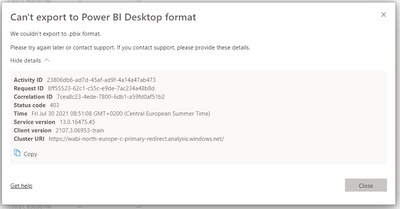
I am not able to export a pbix file due to unknown reasons. I receive status code 403 directly after trying. Does anyone know what this means? Thanks for your help
Hi @BIfanatic ,
Please check these:
There are a few important considerations and limitations associated with downloading (exporting) a .pbix file from Power BI service.
https://docs.microsoft.com/en-us/power-bi/service-export-to-pbix
Best Regards,
Liu Yang
If this post helps, then please consider Accept it as the solution to help the other members find it more quickly.
@BIfanatic
Unless any restrictions are set by your power Bi tenant admin, it should work. If it is a service issue, wait for sometimes and try or raise a support ticket at: https://powerbi.microsoft.com/en-us/support/
⭕ Subscribe and learn Power BI from these videos
⚪ Website ⚪ LinkedIn ⚪ PBI User Group
Sometime this happen due to network bottleneck, would suggest to try downloading different time and see it it work.
I f you still face the issue then please raise tickect with Power BI Support Support | Microsoft Power BI
If this post helps, then please consider Accept it as the solution and give it a thumbs up
If you have recently started exploring Fabric, we'd love to hear how it's going. Your feedback can help with product improvements.
A new Power BI DataViz World Championship is coming this June! Don't miss out on submitting your entry.
Share feedback directly with Fabric product managers, participate in targeted research studies and influence the Fabric roadmap.