cancel
Showing results for 
Search instead for 
Did you mean: 

We've captured the moments from FabCon & SQLCon that everyone is talking about, and we are bringing them to the community, live and on-demand. Starts on April 14th. Register now

Reply
Anonymous
Not applicable

Export issue

Two questions


Is there a way to see how many rows a power bi report has in atable or matrix?


I built amatrix and tried to export it but the sales total of the excel export wont tie to whats in PBI and I have no idea why. to give an idea of scale what does export is about 120k excel rows. Any idea what the issue could be?

7 REPLIES 7
Greg_Deckler
Community Champion
Community Champion

If all you have access to is the Service then I can't think of a way off the top of my head. Other than if you click on the Dataset and create a new report, pick a particular column out that you want and do a Count aggregation. Do you have access to the Desktop file (PBIX)?


Follow on LinkedIn
@ me in replies or I'll lose your thread!!!
Instead of a Kudo, please vote for this idea
Become an expert!: Enterprise DNA
External Tools: MSHGQM
YouTube Channel!: Microsoft Hates Greg
Latest book!:
DAX For Humans

DAX is easy, CALCULATE makes DAX hard...
Anonymous
Not applicable

I have access to desktop and I made this report myself. Can't export out of desktop due to file size

If you click on the Data tab over on the left and then on a table, at the bottom will be the row count. Is that what you are looking for?


Follow on LinkedIn
@ me in replies or I'll lose your thread!!!
Instead of a Kudo, please vote for this idea
Become an expert!: Enterprise DNA
External Tools: MSHGQM
YouTube Channel!: Microsoft Hates Greg
Latest book!:
DAX For Humans

DAX is easy, CALCULATE makes DAX hard...
Anonymous
Not applicable

I do not see that

Weird, you don't see this:


image.png


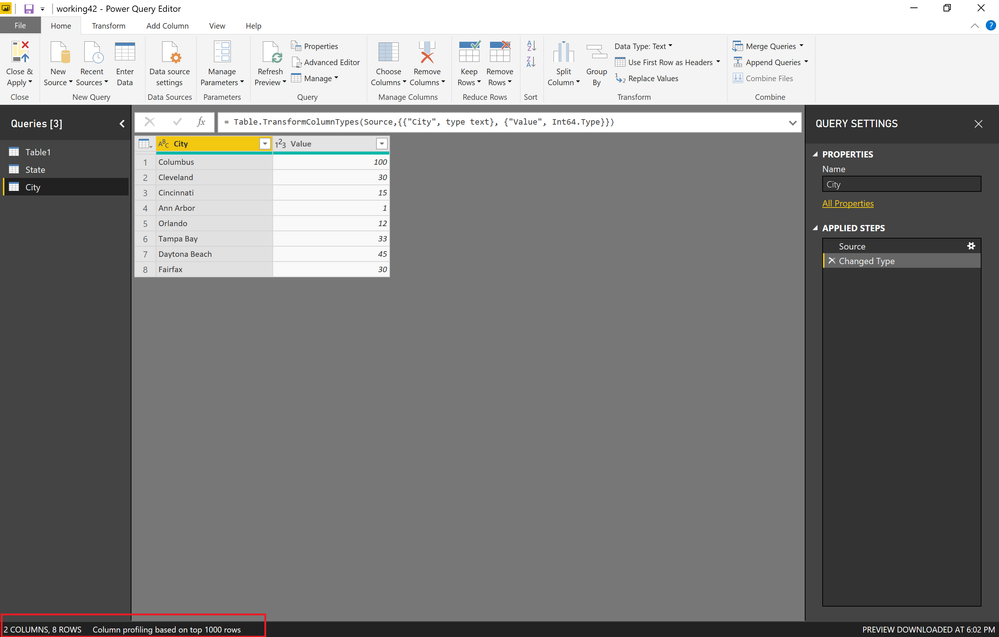
It should also be in Query Editor:


image.png


Follow on LinkedIn
@ me in replies or I'll lose your thread!!!
Instead of a Kudo, please vote for this idea
Become an expert!: Enterprise DNA
External Tools: MSHGQM
YouTube Channel!: Microsoft Hates Greg
Latest book!:
DAX For Humans

DAX is easy, CALCULATE makes DAX hard...
Anonymous
Not applicable

I definitely do not. It is a live connection to a cube though

Anonymous
Not applicable

Hi @Anonymous,


You can try to write a measure to with count row function to get count of current row contents, drag it to matrix visual value field and it will show total row count on total level.

Measure =
COUNTROWS ( Table )


Regards,
Xiaoxin Sheng

Helpful resources

Announcements
New to Fabric survey Carousel

New to Fabric Survey

If you have recently started exploring Fabric, we'd love to hear how it's going. Your feedback can help with product improvements.

Power BI DataViz World Championships carousel

Power BI DataViz World Championships - June 2026

A new Power BI DataViz World Championship is coming this June! Don't miss out on submitting your entry.

Join our Fabric User Panel

Join our Fabric User Panel

Share feedback directly with Fabric product managers, participate in targeted research studies and influence the Fabric roadmap.

March Power BI Update Carousel

Power BI Community Update - March 2026

Check out the March 2026 Power BI update to learn about new features.