
Get certified for free when you join Fabric Data Days 2026 and dive into Fabric, Power BI, SQL, AI, and other essential data skills.
Join nowJuly 7 - July 17 | Round 2 of the Power BI Dataviz World Championships. Don't miss your chance! Learn more
Hi Guys,
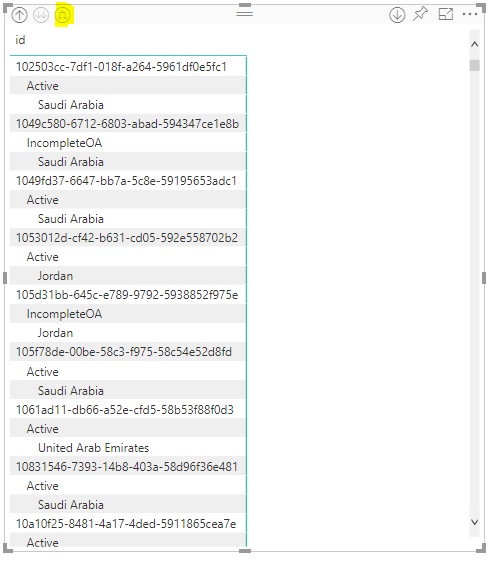
For some reason, the new Matrix table isn't expanding horizontally like it used to do
when clicking on the below highlighted, am getting the data expanded vertically.
Any idea how to get the old look of Matrix table like the below?
Thanks,
Majd
Solved! Go to Solution.
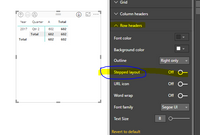
@majdkaid22 I believe this is the "stepped layout" toggle in the Row Headers section under formatting. Disable that and the old matrix layout will come back.
Hi @majdkaid22,
As the @Anonymous said, turn off the button highlighted in blue line as follows.
Best Regards,
Angelia
Join us in Barcelona for FabCon and SQLCon, the Fabric, Power BI, SQL, and AI community event. Save €200 with code FABCMTY200.
Join Fabric Data Days 2026: 60 days of free live/on-demand sessions, challenges, study groups, and certification opportunities.
| User | Count |
|---|---|
| 18 | |
| 12 | |
| 9 | |
| 8 | |
| 5 |
| User | Count |
|---|---|
| 30 | |
| 28 | |
| 25 | |
| 24 | |
| 24 |