cancel
Showing results for 
Search instead for 
Did you mean: 

The Power BI Data Visualization World Championships is back! Get ahead of the game and start preparing now! Learn more

Reply
Anonymous
Not applicable

Expand Collapse icon not visible for Slicer of a report which is published on App

Hello Experts,

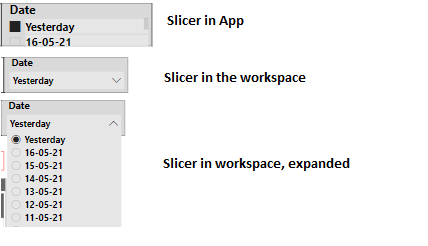
I have published a report on Power BI App with a Date slicer. Surprisingly, the Date slicer is expanded (showing dropdown) and the collapse icon in not visible.

Slicer should be in collapsed mode by default and should show the expand icon. It works fine while seeing the report on Workspace and Desktop application, issue occurs only when accessing the report within the App.


Any help will be higly appreciated!


Slicer collapse_expand Issue.png


Thanks in advance,

Naveen

1 ACCEPTED SOLUTION
Anonymous
Not applicable

Hi @Anonymous 

In desktop and workspace , you can change the type of slicer , but when you publish the report to an app , you cannot edit the report in app .

If you want to change the visual ,you can edit the original report in workspace and then update the report in app . The premise is that you have edit permission for this report .

Ailsa-msft_0-1621500362929.png


Best Regards

Community Support Team _ Ailsa Tao


If this post helps, then please consider Accept it as the solution to help the other members find it more quickly.

View solution in original post

1 REPLY 1
Anonymous
Not applicable

Hi @Anonymous 

In desktop and workspace , you can change the type of slicer , but when you publish the report to an app , you cannot edit the report in app .

If you want to change the visual ,you can edit the original report in workspace and then update the report in app . The premise is that you have edit permission for this report .

Ailsa-msft_0-1621500362929.png


Best Regards

Community Support Team _ Ailsa Tao


If this post helps, then please consider Accept it as the solution to help the other members find it more quickly.

Helpful resources

Announcements
November Power BI Update Carousel

Power BI Monthly Update - November 2025

Check out the November 2025 Power BI update to learn about new features.

Fabric Data Days Carousel

Fabric Data Days

Advance your Data & AI career with 50 days of live learning, contests, hands-on challenges, study groups & certifications and more!

FabCon Atlanta 2026 carousel

FabCon Atlanta 2026

Join us at FabCon Atlanta, March 16-20, for the ultimate Fabric, Power BI, AI and SQL community-led event. Save $200 with code FABCOMM.