Hi,
In a report I am trying to publish there are some static fields imported from local excel worksheets. There are also several fields that pull from a SQL database that we have sitting behind an on-premise gateway.
The fields that use the static data are on import mode and the SQL database fields are on DirectQuery mode.
This all works fine on PowerBI desktop but things break when we publish to app.powerbi.com. The imported static data is fine, but slicers using the directquery data are broken. I tracked the problem to the gateway being disabled for this particular data set. The problem is that the dataset is trying to create a gateway connection to the excel workbooks as well as the sql server database we have setup, despite all the required data already being cached in the pbix.
In the gateway connection dataset options, the gateway dataset has a green tick, which is the only data that actually needs to be refreshed periodically. However, all the other datasources (the workbook files) have a red cross next to them. This prevents enabling the 'use a data gateway' option and is breaking the directquery.
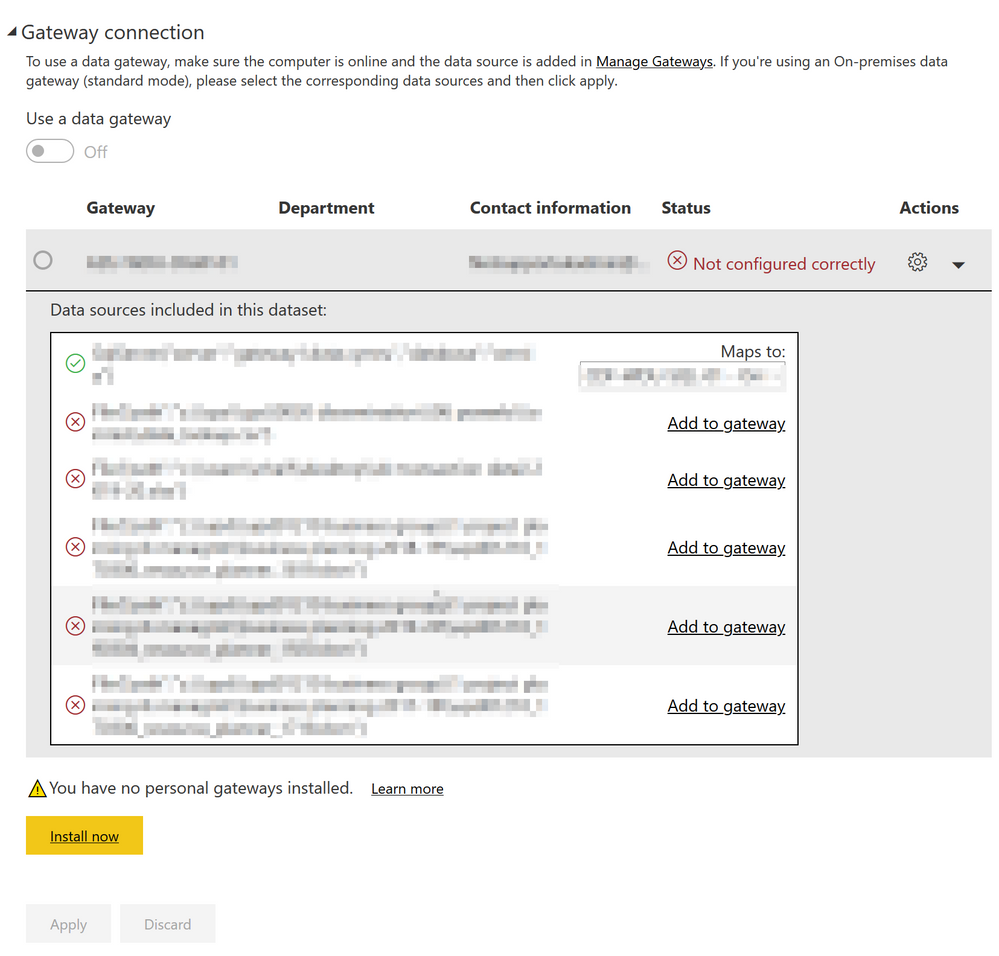
Is there a way to tell powerbi to ignore these datasources as they are not at all required and just use the data for them in the pbix? I do NOT want to make these workbook files accessible to the gateway.
I have tried disabling "include in report refresh" in the query editor but this doesn't solve the problem, and also breaks the data loading locally when we refresh.
Any help or advice would be greatly appreciated. Thank you.