cancel
Showing results for 
Search instead for 
Did you mean: 

View all the Fabric Data Days sessions on demand. View schedule

Reply
Thejeswar
Super User
Super User

Excel export returns a recover message

Hi Guys,

I have a report published to Power BI Service which has data for a couple of months.


This report has a table visual and might have 40k to 50k rows for each month with some 45 columns


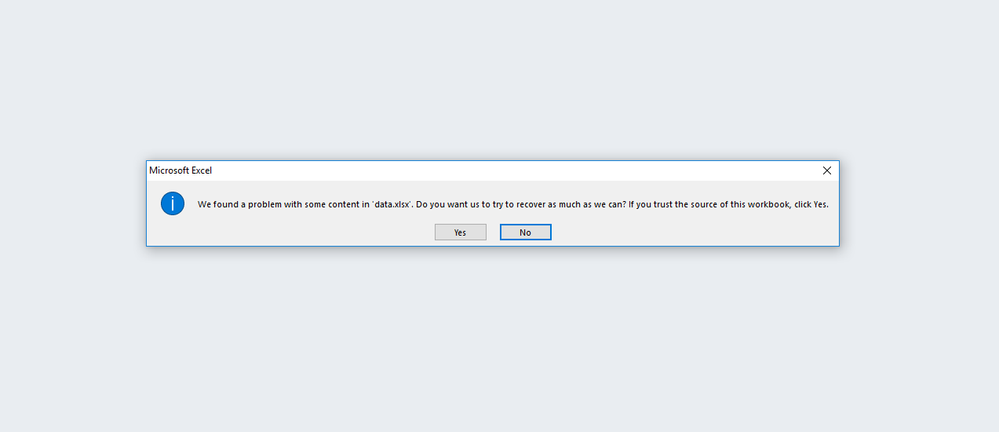
When I export the data to excel, the report gets exported. But when I try to open the excel, it is asking for me to recover the sheet before opening. Once I accept, It recovers the sheet and shows the data.


Below is the screenshot

excelrecover.png


After recovering, it gives me the link to get the cell information of recovered items in an xml file and the xml file with the actual link is displayed in browser


As far as I checked there's not any special items (except few DAX calculations) in the file that could corrupt the file and ask for a recovery of the same


Any idea what is happening?

1 REPLY 1
Anonymous
Not applicable

HI @Thejeswar,


I think it might be compatibility issue between power bi service and new version excel.

Please contact to powerbi/office team to confirm if any unsupported format when export data from power bi service.


Regards,

Xiaoxin Sheng

Helpful resources

Announcements
November Power BI Update Carousel

Power BI Monthly Update - November 2025

Check out the November 2025 Power BI update to learn about new features.

Fabric Data Days Carousel

Fabric Data Days

Advance your Data & AI career with 50 days of live learning, contests, hands-on challenges, study groups & certifications and more!

FabCon Atlanta 2026 carousel

FabCon Atlanta 2026

Join us at FabCon Atlanta, March 16-20, for the ultimate Fabric, Power BI, AI and SQL community-led event. Save $200 with code FABCOMM.

Top Solution Authors