
This is best Fabric, Power BI, SQL and AI community event. How do we know? The last event sold out! Save €200 with code FABCMTY200.
Register nowA new Data Days event is coming soon! This time we’re going bigger than ever. Fabric, Power BI, SQL, AI and more. Don't miss out.
So I create an Excel workbook with an attached dataset, save the workbook in Onedrive for Business and uploaded the workbook. Why cannot you "refresh" the workbook or work with the pivot table in Excel online via PowerBI? How can I get around this and build a basic workbook for people to use in Excel Online (connected to the dataset)? If this is not possible, if they save the Workbook will they be able to refresh?
Hi,
According to your description, you should using Getting Data function on Power BI Service to get the workbook from OneDrive for Business rather than from the local.
If one file is uploaded from OneDrive for Business, any changes on the file from OneDrive for Business will be synchronized with the file on Power Bi Service.
Hope this can help.
Best Regards,
Giotto Zhi
Yes, but when you are in the service, go to workbooks, click a workbook and see it opens in excel online.....you cannot do anything. You cannot filter, modify the pivot table, pull in another field from the PowerBI dataset you built it on, or just refresh. What good is that?
Hi,
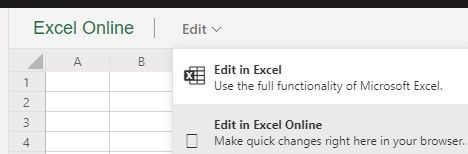
You can edit your workbook in Excel:
Or you can choose 'Import' when get data from OneDrive for Business.
And then use analyze in Excel function.
See this: https://docs.microsoft.com/en-us/power-bi/service-analyze-in-excel#get-started-with-analyze-in-excel
Best Regards,
Giotto Zhi
I cannot edit or refresh in PowerBI as I always get the following message:
Check out the May 2026 Power BI update to learn about new features.
Sign up to receive a private message when registration opens and key events begin.
If you have recently started exploring Fabric, we'd love to hear how it's going. Your feedback can help with product improvements.
| User | Count |
|---|---|
| 9 | |
| 9 | |
| 9 | |
| 7 | |
| 6 |
| User | Count |
|---|---|
| 33 | |
| 25 | |
| 25 | |
| 21 | |
| 19 |