This time we’re going bigger than ever. Fabric, Power BI, SQL, AI and more. We're covering it all. You won't want to miss it.
Learn moreJoin the FabCon + SQLCon recap series. Up next: Power BI, Real-Time Intelligence, IQ and AI, and Data Factory take center stage. All sessions are available on-demand after the live show. Register now
Hi all
I've build a report in Power BI Desktop based on Direct Query to an Exasol DB (not odbc).
After adding the data source on gateway (Data Source Type "Exasol") I've published the report.
When accessing the report I'm getting the error message:
"There is no gateway to acces the data source Extension."
Details: Data source unreachable. There is no gateway to acces the data source Extension. Verify the gateway connection configuration on the dataset settings page and make sure all required data sources are added to the selected data gateway.
1. There is no "Extension" data source.
2. The Custom Connector Exasol should be fully supported in Power BI Desktop, the On Premise Data Gateway (Personal and Enterprise), and Power BI Service (via the Gateway) regarding this site:
3. When I change the storage mode from "direct query" to "import" the report in Power BI Service works (with the defined data source above). But regarding this site direct query should be supported.
https://docs.microsoft.com/en-us/power-bi/service-gateway-data-sources
Thanks for any advices / ideas!
Regards
Dominique
Hi @Anonymous ,
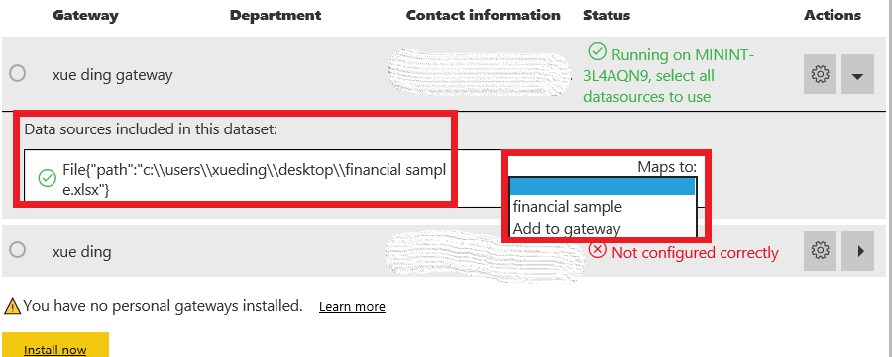
Please check the data source path and if it maps to the correct gateway.
Best Regards,
Xue Ding
If this post helps, then please consider Accept it as the solution to help the other members find it more quickly.
Thanks for your response. When I check the Dataset Settings for this Gateway connection I get the Error Message "Not configured correctly" and so I'm not able to select the Gateway (greyed out). So I also can't do the mapping.
When I switch to "Manage Gateways" I can see the connection with the correct settings and the message "Connection Successful"...
Maybe it's just a problem with the "Data Source Name"? But i can't figure out the necessary name because I can't see or set this name in Power BI Desktop.
Best regards
Dominique
Check out the April 2026 Power BI update to learn about new features.
If you have recently started exploring Fabric, we'd love to hear how it's going. Your feedback can help with product improvements.
A new Power BI DataViz World Championship is coming this June! Don't miss out on submitting your entry.
| User | Count |
|---|---|
| 11 | |
| 10 | |
| 9 | |
| 8 | |
| 8 |
| User | Count |
|---|---|
| 49 | |
| 34 | |
| 27 | |
| 21 | |
| 20 |