Get certified for free when you join Fabric Data Days 2026 and dive into Fabric, Power BI, SQL, AI, and other essential data skills.
Join nowJuly 7 - July 17 | Round 2 of the Power BI Dataviz World Championships. Don't miss your chance! Learn more
HI,
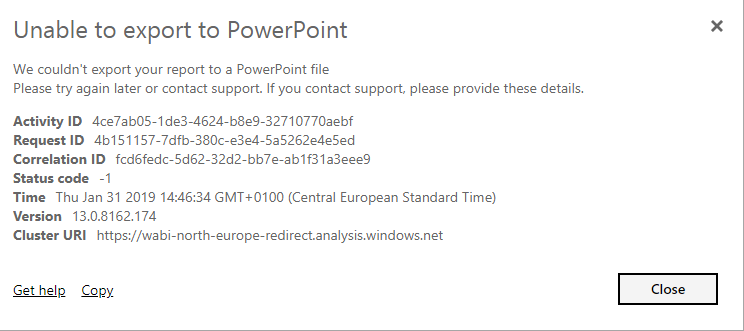
I am trying to export a report in Power Point and it is taking some time and fails with the Following error.
Not sure what this could be , can anyone please help?
Solved! Go to Solution.
HI @Anonymous,
I'd like to suggest you to take a look at following document about the limitations of export to powerpoint:
Export reports from Power BI to PowerPoint
Regards,
Xiaoxin Sheng
Hi @Anonymous,
I can export to power point file without that issue. What type of datasource you test? Can you please provide more details?
BTW, have you contact to admin to confirm if this export features were turned off?
Regards,
Xiaoxin Sheng
Hi,
I checked with our admin, it is not turned off.
I have a data from excel in this case.
Not sure if this could be due to some formatting. Do we know when status code -1 appears? Then I could try to make changes in my report if needed as well.
Thanks,
Aritra
HI @Anonymous,
I'd like to suggest you to take a look at following document about the limitations of export to powerpoint:
Export reports from Power BI to PowerPoint
Regards,
Xiaoxin Sheng
Thank you this was helpful. It was due to custom size of the reports. Once I change that, it exports fine.
Join us in Barcelona for FabCon and SQLCon, the Fabric, Power BI, SQL, and AI community event. Save €200 with code FABCMTY200.
Join Fabric Data Days 2026: 60 days of free live/on-demand sessions, challenges, study groups, and certification opportunities.
| User | Count |
|---|---|
| 16 | |
| 14 | |
| 9 | |
| 9 | |
| 8 |
| User | Count |
|---|---|
| 33 | |
| 29 | |
| 27 | |
| 25 | |
| 25 |