cancel
Showing results for 
Search instead for 
Did you mean: 

The Power BI Data Visualization World Championships is back! Get ahead of the game and start preparing now! Learn more

Reply
alatwork
Microsoft Employee
Microsoft Employee

Error while executing Get App api call. 403 - "API is not accessible for application"

When making this api call https://api.powerbi.com/v1.0/myorg/apps/{app id} using a service principal (SPN) we are getting the following error.


{
    "Message""API is not accessible for application"
}
 
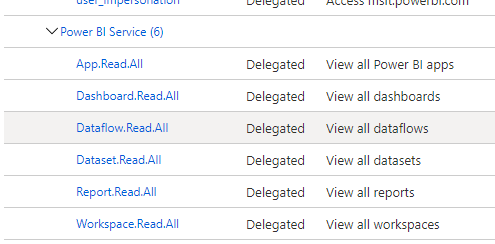
We have granted the API permissions to our SPN.
 
SPNPerms.png
 
3 REPLIES 3
Anonymous
Not applicable

Make sure you target a new workspace and not the default "My Workspace" and check you have assigned all relevant permissions.


See my blog hope it helps: https://blog.joshduxbury.co.uk/2021/04/22/import-data-into-power-bi-using-rest-logic-apps/

v-lionel-msft
Community Support
Community Support

Hi @alatwork ,


You may need to refer to this article for configuration.

Register an Azure AD application to use with Power BI 


Best regards,
Lionel Chen

If this post helps, then please consider Accept it as the solution to help the other members find it more quickly.

We have followed those steps as well.  All other api calls work, it's just the call to get an App fails with the permission message.

Helpful resources

Announcements
Power BI DataViz World Championships

Power BI Dataviz World Championships

The Power BI Data Visualization World Championships is back! Get ahead of the game and start preparing now!

December 2025 Power BI Update Carousel

Power BI Monthly Update - December 2025

Check out the December 2025 Power BI Holiday Recap!

FabCon Atlanta 2026 carousel

FabCon Atlanta 2026

Join us at FabCon Atlanta, March 16-20, for the ultimate Fabric, Power BI, AI and SQL community-led event. Save $200 with code FABCOMM.