Join us at FabCon Atlanta from March 16 - 20, 2026, for the ultimate Fabric, Power BI, AI and SQL community-led event. Save $200 with code FABCOMM.
Register now!Learn from the best! Meet the four finalists headed to the FINALS of the Power BI Dataviz World Championships! Register now
I have created a Dashboard based on Row-Level_security Dataset.
When I (the owner) open it directly navigating from workspace - I works.
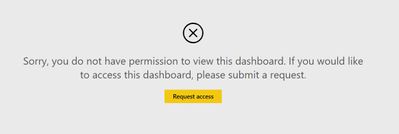
But when I go to "Share dashboard" -> "Access" and copy-paste Dashboard link - it is showing this Error:
The working link (when navigating) looks like this (I've changed some characters):
The non-working link looks like this:
https://app.powerbi.com/groups/me/dashboards/15x6x4x9-dxx1-4x6c-a5xx-e04c5x38xx3
Why the Dashboard link is not working? Even for me?
Thanks
Solved! Go to Solution.
Hi @Anonymous
What I have found when sharing is to make sure that the word "me" is not included in the URL. When that happens it will fail in my experience. I think it has to do with the dashboard link being in your personal context.
So what I always do is use the first link to Share dashboards with users via a URL link.
Hi @Anonymous
What I have found when sharing is to make sure that the word "me" is not included in the URL. When that happens it will fail in my experience. I think it has to do with the dashboard link being in your personal context.
So what I always do is use the first link to Share dashboards with users via a URL link.
Thanks @GilbertQ
Is it a bug? this link is in the Share section of a Dashboard...
I used to share it with my users..
Hi @Anonymous
I think it might be, as I have found that it often gave the users an error when I used the link under the Access and then Dashboard Link.
I did share a dashboard with myself and when the email comes with the hyperlink it actually has an invitationId in the hyperlink, which must then re-direct to the actual dashboard.
This was the link with the content removed: https://app.powerbi.com/claiminviteredirect.html?tenant=xxxx-xxxx-xxxx-xxxx-xxxxxxxx&invitationId=xxxxxxx-xxxx-xxxx-xxxx-xxxx%3d&email=email@domain.com
Share feedback directly with Fabric product managers, participate in targeted research studies and influence the Fabric roadmap.
Check out the February 2026 Power BI update to learn about new features.
| User | Count |
|---|---|
| 44 | |
| 44 | |
| 37 | |
| 25 | |
| 25 |