cancel
Showing results for 
Search instead for 
Did you mean: 

The Power BI Data Visualization World Championships is back! Get ahead of the game and start preparing now! Learn more

Reply
jfpalacio
New Member

Error sharing report using Direct Query

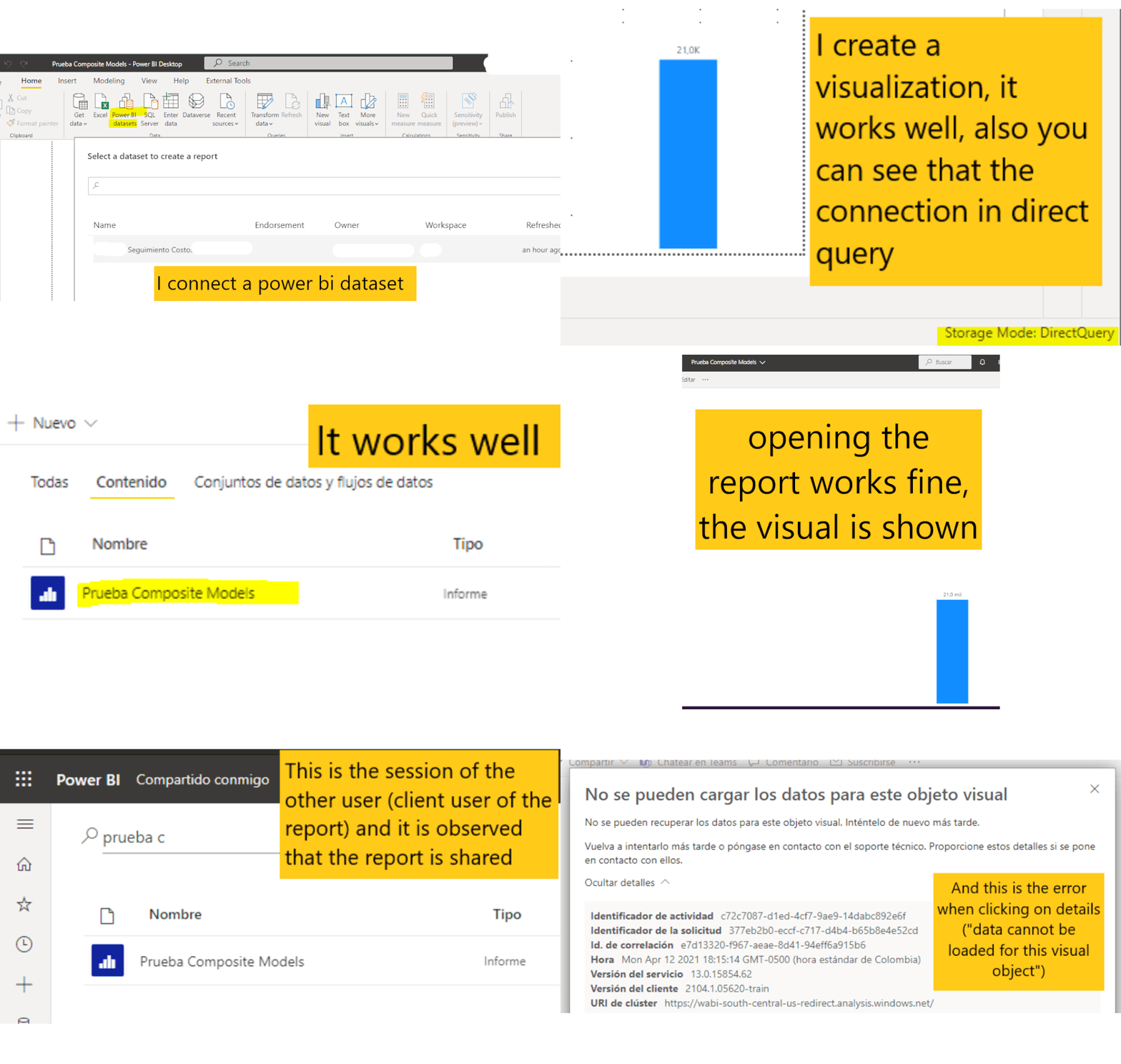
I need your help with this error in the visuals that cannot be displayed and in details it shows "The data for this visual cannot be loaded". The dashboard is very simple: I connect a Power BI Dataset, I added it to a local model (DirectQuery connection), I publish it in Power BI Services and up to there everything works fine, the problem appears for the users to whom I share the report.


I made a GIF with the step by step to better explain, all the construction and publication of the report works well, it fails to the users that are shared.


Error DQ PBI.gif


1 ACCEPTED SOLUTION
v-cazheng-msft
Community Support
Community Support

Hi @jfpalacio 

After testing, I found that if you want to share a report created based on the datasets, you need give this user ‘Build’ permissions to the original datasets. In addition, they need be at least a Viewer of the workspace that stores the new report. You can try it.


Best Regards

Caiyun Zheng


Is that the answer you're looking for? If this post helps, then please consider Accept it as the solution to help the other members find it more quickly.


View solution in original post

4 REPLIES 4
v-cazheng-msft
Community Support
Community Support

Hi @jfpalacio 

After testing, I found that if you want to share a report created based on the datasets, you need give this user ‘Build’ permissions to the original datasets. In addition, they need be at least a Viewer of the workspace that stores the new report. You can try it.


Best Regards

Caiyun Zheng


Is that the answer you're looking for? If this post helps, then please consider Accept it as the solution to help the other members find it more quickly.


We've struggled with this as well until we discovered that the end user is required to have Build permissions on the shared dataset. However, this is only the case when the report that was created from the shared dataset also contains an additional data source and in turn creating it's own dataset. If the report created from the shared dataset does not have an additional data source, the end user only requires View permissions on the shared dataset.


The issue with the first scenario is that we may not want our end users to have the ability to connect to the shared dataset which is a possibility with assigning them Build permissions.

This is exacly my issue as well. We don't want the users to have build permissions on the shared dataset. Is there any solution without giving the endusers this build permission? 

GilbertQ
Super User
Super User

Hi @jfpalacio 


Can you make sure that the users who are accessing the underlying dataset have the build permissions on the dataset?


Did I answer your question? Mark my post as a solution!

Proud to be a Super User!


Power BI Blog

Helpful resources

Announcements
Power BI DataViz World Championships

Power BI Dataviz World Championships

The Power BI Data Visualization World Championships is back! Get ahead of the game and start preparing now!

December 2025 Power BI Update Carousel

Power BI Monthly Update - December 2025

Check out the December 2025 Power BI Holiday Recap!

FabCon Atlanta 2026 carousel

FabCon Atlanta 2026

Join us at FabCon Atlanta, March 16-20, for the ultimate Fabric, Power BI, AI and SQL community-led event. Save $200 with code FABCOMM.