



cancel
Showing results for 
Search instead for 
Did you mean: 

The Power BI Data Visualization World Championships is back! Get ahead of the game and start preparing now! Learn more

Reply
Yarisch77
Frequent Visitor

Error dataflow incremental refresh

Hi,

I get an error every time i try to set up an incremental refresh on my dataflow:


Problem seems to be linked with the scheduled range, resp. the configuration of the incremental refresh itself. Any idea to handle this?

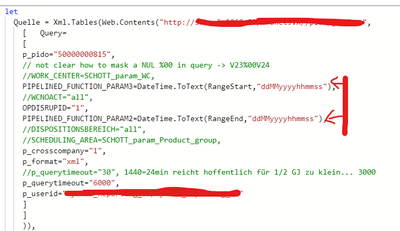
Reference in the Editor:

Yarisch77_0-1637302724373.png

Error message:

Yarisch77_1-1637302910987.png

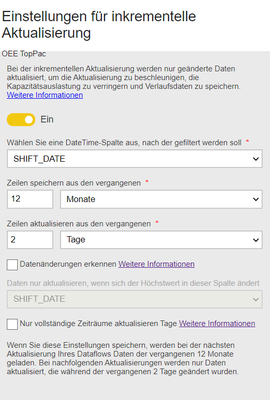
Incremental setup:

Yarisch77_2-1637302967036.png


After set up the system generates an automated range start resp. range end in the dataflow:

Yarisch77_3-1637303053958.png

Yarisch77_4-1637303089215.png

If I set the range manually in the dataflow with "normal" dates dataflow just works fine:

Yarisch77_5-1637303171090.png

Thx in advance!


1 ACCEPTED SOLUTION
v-xiaotang
Community Support
Community Support

Hi @Yarisch77 

The problem is linked with RangeStart & RangeEnd, 1.1.1 00:00:00 is not the correct data format, just use the second way or perhaps convert it to something like December 30th, 1899, which is the base date for DAX

vxiaotang_1-1637559797432.png


Best Regards,

Community Support Team _Tang

If this post helps, please consider Accept it as the solution to help the other members find it more quickly.

View solution in original post

2 REPLIES 2
v-xiaotang
Community Support
Community Support

Hi @Yarisch77 

Have you solved this question? Could you accept my answer as solution? To help others find it quickly. Thanks.

If you still have question, please let me know.


Best Regards,

Community Support Team _Tang

If this post helps, please consider Accept it as the solution to help the other members find it more quickly.

v-xiaotang
Community Support
Community Support

Hi @Yarisch77 

The problem is linked with RangeStart & RangeEnd, 1.1.1 00:00:00 is not the correct data format, just use the second way or perhaps convert it to something like December 30th, 1899, which is the base date for DAX

vxiaotang_1-1637559797432.png


Best Regards,

Community Support Team _Tang

If this post helps, please consider Accept it as the solution to help the other members find it more quickly.

Helpful resources

Announcements
Power BI DataViz World Championships

Power BI Dataviz World Championships

The Power BI Data Visualization World Championships is back! Get ahead of the game and start preparing now!

December 2025 Power BI Update Carousel

Power BI Monthly Update - December 2025

Check out the December 2025 Power BI Holiday Recap!

FabCon Atlanta 2026 carousel

FabCon Atlanta 2026

Join us at FabCon Atlanta, March 16-20, for the ultimate Fabric, Power BI, AI and SQL community-led event. Save $200 with code FABCOMM.