



Get certified for free when you join Fabric Data Days 2026 and dive into Fabric, Power BI, SQL, AI, and other essential data skills.
Join nowData Days is here! Join us now for 60+ days of learning, challenges, and connection. Learn more
Hi,
I get an error every time i try to set up an incremental refresh on my dataflow:
Problem seems to be linked with the scheduled range, resp. the configuration of the incremental refresh itself. Any idea to handle this?
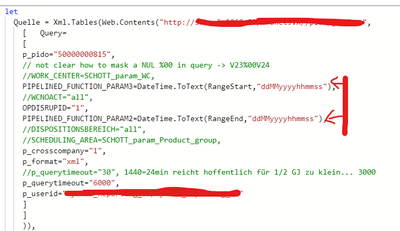
Reference in the Editor:
Error message:
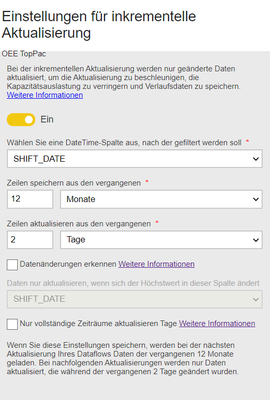
Incremental setup:
After set up the system generates an automated range start resp. range end in the dataflow:
If I set the range manually in the dataflow with "normal" dates dataflow just works fine:
Thx in advance!
Solved! Go to Solution.
Hi @Yarisch77
The problem is linked with RangeStart & RangeEnd, 1.1.1 00:00:00 is not the correct data format, just use the second way or perhaps convert it to something like December 30th, 1899, which is the base date for DAX
Best Regards,
Community Support Team _Tang
If this post helps, please consider Accept it as the solution to help the other members find it more quickly.
Hi @Yarisch77
Have you solved this question? Could you accept my answer as solution? To help others find it quickly. Thanks.
If you still have question, please let me know.
Best Regards,
Community Support Team _Tang
If this post helps, please consider Accept it as the solution to help the other members find it more quickly.
Hi @Yarisch77
The problem is linked with RangeStart & RangeEnd, 1.1.1 00:00:00 is not the correct data format, just use the second way or perhaps convert it to something like December 30th, 1899, which is the base date for DAX
Best Regards,
Community Support Team _Tang
If this post helps, please consider Accept it as the solution to help the other members find it more quickly.
Don't miss out on Data Days, June 15 through August 7. Learn Fabric, Power BI, SQL, AI and more.
Check out the May 2026 Power BI update to learn about new features.
| User | Count |
|---|---|
| 16 | |
| 10 | |
| 10 | |
| 8 | |
| 7 |
| User | Count |
|---|---|
| 40 | |
| 36 | |
| 35 | |
| 28 | |
| 20 |