Get certified for free when you join Fabric Data Days 2026 and dive into Fabric, Power BI, SQL, AI, and other essential data skills.
Join nowData Days is here! Join us now for 60+ days of learning, challenges, and connection. Learn more
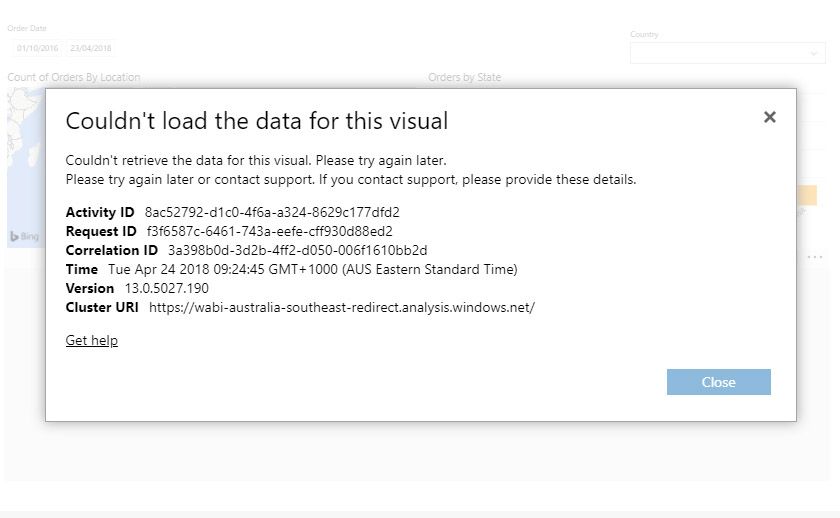
We have a report which just started complaining about not being able to retrieve data. This only started occurring in the last day or two. We are running the report in the embedded frame when it fails. If we run the report locally using power bi desktop or through the app.powerbi.com utility, it works fine. The visual is just a table. See the screenshot for the error.
Solved! Go to Solution.
Hi @kdonahue100,
Glad to hear the issue is gone now.
I will close this thread.
Best Regards,
Qiuyun Yu
Yup, its working now. Thanks
Hi @kdonahue100,
The comment is removed from the support site. Please test again to see if the issue is fixed now.
Best Regards,
Qiuyun Yu
Just found this:
https://powerbi.microsoft.com/en-us/support/
Which seems like it is related to our issue since we are using Direct Queries.
We have made no changes to the report with the issue since January. I have tried getting the latest version of Power BI Desktop, saving the report and republishing, and still get the same problem.
Don't miss out on Data Days, June 15 through August 7. Learn Fabric, Power BI, SQL, AI and more.
Check out the May 2026 Power BI update to learn about new features.
| User | Count |
|---|---|
| 15 | |
| 10 | |
| 10 | |
| 8 | |
| 7 |
| User | Count |
|---|---|
| 41 | |
| 37 | |
| 35 | |
| 29 | |
| 20 |
